[Troubleshooting] - Tech Support / Repair Tech / Helpdesk Tech Tips & Tricks
Troubleshooting Tips & Tricks
What is the problem?
ⓘ This helps identify the severity of the issue and ground yourself back to what the original problem was.
What is the error message? If there is one.
ⓘ If the software gives you an error message, believe it or not, that is most of the work done....if maybe half of your cases but it usually depends. That being said, always make sure there isn't some indication of an error when being told the issue. It goes really far. Some old printers from the 90's even gave error messages. They have been around forever for a reason! Use them!
When did this start and how long has this been going on for?
ⓘ The timeline of events are very important to know. I once knew a place in my home town where lightning struck near their building and fried like 10 KDS (Kitchen Display System). They thankfully were honest and talked about how the storms hit them hard, but believe it or not, there are people/customers who will lie about how an issue started happening. Just always be vigilant and play troubleshooting like a detective!
Is this happening with multiple people or multiple devices?
ⓘ Is grandpa unable to watch Hallmark again or is there something different about the one device with the issue? Always investigate to find out if the issue resides elsewhere as it can help you fix the problem much faster.
What is your current theory for the cause of the problem?
ⓘ It is important to remember when creating your first theory to remind yourself if the issue is related to software or hardware, then go from there. Deducing hardware being an issue definitely takes more effort in time, but there are plenty of signs that can indicate to someone right away that they have a hardware issue.
What do you suggest as the solution to this problem?
ⓘ There is no such thing as a dumb solution; but there are bandaid solutions. Temporary but actually end up being permanent.
Troubleshooting Tips & Tricks - Day 1 of Troubleshooting Scenarios
Before anything else, if you are reviewing this helpful training article, please check out the first link right below here.
Here are some simple troubleshooting questions to be asking yourself when gathering information and troubleshooting an issue.
Scenario #1 - The WiFi Works; Except for When It Doesn't
"Bonnie reports that her laptop keeps losing internet connection during video calls, but browsing websites usually works fine. Other devices in the house seem okay."
ⓘ Solutions for this scenario are suggested from the study group below.
Kaleb: Check the status of the wifi icon in the bottom right corner. Make sure it is actually connected and not just a failed connection.
Brian: I would do an internet speed test to see if it is fast enough to do video calls.
Gabriel: I would check on other devices to see if they are struggling to make video calls and losing connection as well.
ⓘ Solutions will also be put under comments under this page as well as a team-building and homework exercise!
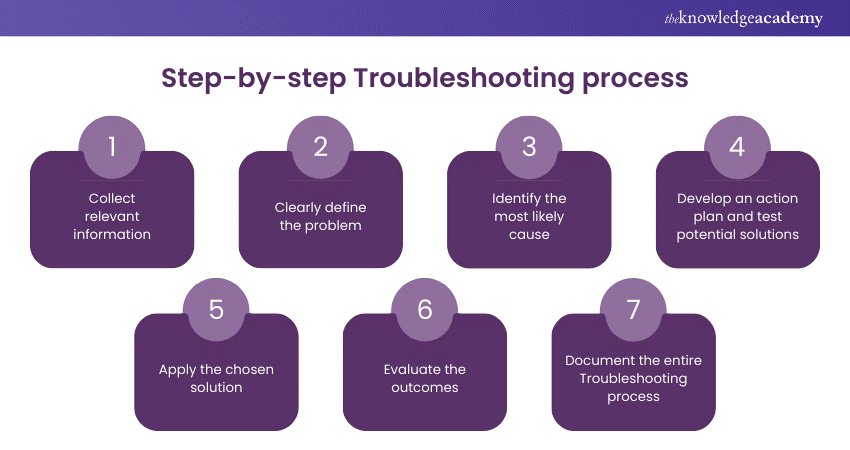
Below is a chart giving the step-by-step process of troubleshooting:

Scenario #2 - User Can't Login To Their Computer
"Noah reports that he can no longer login to his Dell tower pc at home. He calls you up since you know tech stuff pretty well and wants some advice."
ⓘ Solutions for this scenario are suggested from the study group below.
Scenario #3 - No Internet Access
"Gibby reports that he no longer has internet and would like to figure out why his YouTube music videos are no longer loading."
ⓘ Solutions for this scenario are suggested from the study group below.
Scenario #4 - Printer Not Printing
"Brian tells his friend from high school that the printer for home room no longer works. He incites you for some help in fixing it since the school won't do it."
ⓘ Solutions for this scenario are suggested from the study group below.
Kaleb: Check to see if the drivers for the printer are updated. Make sure it is connected as well.
Brian: Check if the system itself is providing any error codes.
Gabriel: Check to see if it has power. Check to see if it responsive to any form of power change or testing the physical nature of the printer.