# Windows Operating Systems

# SOP Template - DO NOT USE

<table id="bkmrk-author-date-revision" style="border-collapse:collapse;width:100%;height:119.2px;border-width:1px;border-color:rgb(0,0,0);"><colgroup><col style="width:33.3333%;"></col><col style="width:33.3333%;"></col><col style="width:33.3333%;"></col></colgroup><tbody><tr style="height:29.8px;"><td style="height:29.8px;background-color:rgb(194,224,244);border-color:rgb(0,0,0);">**<span style="color:rgb(0,0,0);">Author</span>**  
</td><td style="height:29.8px;background-color:rgb(194,224,244);border-color:rgb(0,0,0);">**<span style="color:rgb(0,0,0);">Date</span>**  
</td><td style="height:29.8px;background-color:rgb(194,224,244);border-color:rgb(0,0,0);">**<span style="color:rgb(0,0,0);">Revision</span>**  
</td></tr><tr style="height:29.8px;"><td style="height:29.8px;border-color:rgb(0,0,0);">  
</td><td style="height:29.8px;border-color:rgb(0,0,0);">  
</td></tr></tbody></table>

<table id="bkmrk-related-product-%28if-" style="border-collapse:collapse;width:112.738%;height:199.4px;border-width:1px;border-color:rgb(0,0,0);"><colgroup><col style="width:22.0501%;"></col><col style="width:77.9499%;"></col></colgroup><tbody><tr style="height:29.8px;"><td style="background-color:rgb(194,224,244);height:29.8px;border-color:rgb(0,0,0);">**<span style="color:rgb(0,0,0);">Related product (if any):  
</span>**</td><td style="height:29.8px;border-color:rgb(0,0,0);">  
</td></tr><tr style="height:80.2px;"><td style="background-color:rgb(194,224,244);height:80.2px;border-color:rgb(0,0,0);">**<span style="color:rgb(0,0,0);">Description:</span>**</td><td style="height:80.2px;border-color:rgb(0,0,0);">  
</td></tr><tr style="height:29.8px;"><td style="background-color:rgb(194,224,244);height:29.8px;border-color:rgb(0,0,0);">**<span style="color:rgb(0,0,0);">Symptoms:  
</span>**</td><td style="height:29.8px;border-color:rgb(0,0,0);">  
</td></tr><tr style="height:29.8px;"><td style="background-color:rgb(194,224,244);height:29.8px;border-color:rgb(0,0,0);">**<span style="color:rgb(0,0,0);">Cause:  
</span>**</td><td style="height:29.8px;border-color:rgb(0,0,0);">  
</td></tr><tr><td style="background-color:rgb(194,224,244);border-color:rgb(0,0,0);">**<span style="color:rgb(0,0,0);">Files Needed:  
</span>**</td><td style="border-color:rgb(0,0,0);"> </td></tr><tr style="height:29.8px;"><td style="background-color:rgb(194,224,244);height:29.8px;border-color:rgb(0,0,0);">**<span style="color:rgb(0,0,0);">Steps to Correct:  
</span>**</td><td style="height:29.8px;border-color:rgb(0,0,0);"></td></tr></tbody></table>

# Applications

Documentation on apps like Discord, Google Chrome, etc.

# SOP Template - DO NOT USE

<table border="1" id="bkmrk-author-date-revision" style="border-collapse: collapse; width: 100%; height: 119.2px; border-width: 1px; border-color: rgb(0, 0, 0);"><colgroup><col style="width: 33.3333%;"></col><col style="width: 33.3333%;"></col><col style="width: 33.3333%;"></col></colgroup><tbody><tr style="height: 29.8px;"><td style="height: 29.8px; background-color: rgb(194, 224, 244); border-color: rgb(0, 0, 0);">**<span style="color: rgb(0, 0, 0);">Author</span>**  
</td><td style="height: 29.8px; background-color: rgb(194, 224, 244); border-color: rgb(0, 0, 0);">**<span style="color: rgb(0, 0, 0);">Date</span>**  
</td><td style="height: 29.8px; background-color: rgb(194, 224, 244); border-color: rgb(0, 0, 0);">**<span style="color: rgb(0, 0, 0);">Revision</span>**  
</td></tr><tr style="height: 29.8px;"><td style="height: 29.8px; border-color: rgb(0, 0, 0);">  
</td><td style="height: 29.8px; border-color: rgb(0, 0, 0);">  
</td></tr></tbody></table>

<table border="1" id="bkmrk-related-product-%28if-" style="border-collapse: collapse; width: 112.738%; height: 199.4px; border-width: 1px; border-color: rgb(0, 0, 0);"><colgroup><col style="width: 22.0501%;"></col><col style="width: 77.9499%;"></col></colgroup><tbody><tr style="height: 29.8px;"><td style="background-color: rgb(194, 224, 244); height: 29.8px; border-color: rgb(0, 0, 0);">**<span style="color: rgb(0, 0, 0);">Related product (if any):  
</span>**</td><td style="height: 29.8px; border-color: rgb(0, 0, 0);">  
</td></tr><tr style="height: 80.2px;"><td style="background-color: rgb(194, 224, 244); height: 80.2px; border-color: rgb(0, 0, 0);">**<span style="color: rgb(0, 0, 0);">Description:</span>**</td><td style="height: 80.2px; border-color: rgb(0, 0, 0);">  
</td></tr><tr style="height: 29.8px;"><td style="background-color: rgb(194, 224, 244); height: 29.8px; border-color: rgb(0, 0, 0);">**<span style="color: rgb(0, 0, 0);">Symptoms:  
</span>**</td><td style="height: 29.8px; border-color: rgb(0, 0, 0);">  
</td></tr><tr style="height: 29.8px;"><td style="background-color: rgb(194, 224, 244); height: 29.8px; border-color: rgb(0, 0, 0);">**<span style="color: rgb(0, 0, 0);">Cause:  
</span>**</td><td style="height: 29.8px; border-color: rgb(0, 0, 0);">  
</td></tr><tr><td style="background-color: rgb(194, 224, 244); border-color: rgb(0, 0, 0);">**<span style="color: rgb(0, 0, 0);">Files Needed:  
</span>**</td><td style="border-color: rgb(0, 0, 0);"> </td></tr><tr style="height: 29.8px;"><td style="background-color: rgb(194, 224, 244); height: 29.8px; border-color: rgb(0, 0, 0);">**<span style="color: rgb(0, 0, 0);">Steps to Correct:  
</span>**</td><td style="height: 29.8px; border-color: rgb(0, 0, 0);"></td></tr></tbody></table>

# Powershell

Powershell commands and scripts.

# SOP Template - DO NOT USE

<table border="1" id="bkmrk-author-date-revision" style="border-collapse: collapse; width: 100%; height: 119.2px; border-width: 1px; border-color: rgb(0, 0, 0);"><colgroup><col style="width: 33.3333%;"></col><col style="width: 33.3333%;"></col><col style="width: 33.3333%;"></col></colgroup><tbody><tr style="height: 29.8px;"><td style="height: 29.8px; background-color: rgb(194, 224, 244); border-color: rgb(0, 0, 0);">**<span style="color: rgb(0, 0, 0);">Author</span>**  
</td><td style="height: 29.8px; background-color: rgb(194, 224, 244); border-color: rgb(0, 0, 0);">**<span style="color: rgb(0, 0, 0);">Date</span>**  
</td><td style="height: 29.8px; background-color: rgb(194, 224, 244); border-color: rgb(0, 0, 0);">**<span style="color: rgb(0, 0, 0);">Revision</span>**  
</td></tr><tr style="height: 29.8px;"><td style="height: 29.8px; border-color: rgb(0, 0, 0);">  
</td><td style="height: 29.8px; border-color: rgb(0, 0, 0);">  
</td></tr></tbody></table>

<table border="1" id="bkmrk-related-product-%28if-" style="border-collapse: collapse; width: 112.738%; height: 199.4px; border-width: 1px; border-color: rgb(0, 0, 0);"><colgroup><col style="width: 22.0501%;"></col><col style="width: 77.9499%;"></col></colgroup><tbody><tr style="height: 29.8px;"><td style="background-color: rgb(194, 224, 244); height: 29.8px; border-color: rgb(0, 0, 0);">**<span style="color: rgb(0, 0, 0);">Related product (if any):  
</span>**</td><td style="height: 29.8px; border-color: rgb(0, 0, 0);">  
</td></tr><tr style="height: 80.2px;"><td style="background-color: rgb(194, 224, 244); height: 80.2px; border-color: rgb(0, 0, 0);">**<span style="color: rgb(0, 0, 0);">Description:</span>**</td><td style="height: 80.2px; border-color: rgb(0, 0, 0);">  
</td></tr><tr style="height: 29.8px;"><td style="background-color: rgb(194, 224, 244); height: 29.8px; border-color: rgb(0, 0, 0);">**<span style="color: rgb(0, 0, 0);">Symptoms:  
</span>**</td><td style="height: 29.8px; border-color: rgb(0, 0, 0);">  
</td></tr><tr style="height: 29.8px;"><td style="background-color: rgb(194, 224, 244); height: 29.8px; border-color: rgb(0, 0, 0);">**<span style="color: rgb(0, 0, 0);">Cause:  
</span>**</td><td style="height: 29.8px; border-color: rgb(0, 0, 0);">  
</td></tr><tr><td style="background-color: rgb(194, 224, 244); border-color: rgb(0, 0, 0);">**<span style="color: rgb(0, 0, 0);">Files Needed:  
</span>**</td><td style="border-color: rgb(0, 0, 0);"> </td></tr><tr style="height: 29.8px;"><td style="background-color: rgb(194, 224, 244); height: 29.8px; border-color: rgb(0, 0, 0);">**<span style="color: rgb(0, 0, 0);">Steps to Correct:  
</span>**</td><td style="height: 29.8px; border-color: rgb(0, 0, 0);"></td></tr></tbody></table>

# Windows Powershell - Creating an Audio Alert when PC starts Overheating

<table border="1" id="bkmrk-author-date-revision" style="border-collapse: collapse; width: 100%; height: 119.2px; border-width: 1px; border-color: rgb(0, 0, 0);"><colgroup><col style="width: 33.3333%;"></col><col style="width: 33.3333%;"></col><col style="width: 33.3333%;"></col></colgroup><tbody><tr style="height: 29.8px;"><td style="height: 29.8px; background-color: rgb(194, 224, 244); border-color: rgb(0, 0, 0);">**<span style="color: rgb(0, 0, 0);">Author</span>**  
</td><td style="height: 29.8px; background-color: rgb(194, 224, 244); border-color: rgb(0, 0, 0);">**<span style="color: rgb(0, 0, 0);">Date</span>**  
</td><td style="height: 29.8px; background-color: rgb(194, 224, 244); border-color: rgb(0, 0, 0);">**<span style="color: rgb(0, 0, 0);">Revision</span>**  
</td></tr><tr style="height: 29.8px;"><td style="height: 29.8px; border-color: rgb(0, 0, 0);"><span class="TextRun SCXO110082575 BCX2" data-contrast="auto" lang="EN-US" style="color: windowtext; font-size: 11pt; font-family: Calibri, sans-serif; line-height: 18px;" xml:lang="EN-US"><span class="NormalTextRun SCXO110082575 BCX2" style="background-color: inherit;">Caleb Brendel  
</span></span></td><td style="height: 29.8px; border-color: rgb(0, 0, 0);"><span class="TextRun SCXO110082575 BCX2" data-contrast="auto" lang="EN-US" style="color: windowtext; font-size: 11pt; font-family: Calibri, sans-serif; line-height: 18px;" xml:lang="EN-US"><span class="NormalTextRun SCXO110082575 BCX2" style="background-color: inherit;">05/04/2024</span></span></td><td style="height: 29.8px; border-color: rgb(0, 0, 0);"><span class="TextRun SCXO110082575 BCX2" data-contrast="auto" lang="EN-US" style="color: windowtext; font-size: 11pt; font-family: Calibri, sans-serif; line-height: 18px;" xml:lang="EN-US"><span class="NormalTextRun SCXO110082575 BCX2" style="background-color: inherit;">1.0</span></span></td></tr></tbody></table>

<table border="1" id="bkmrk-related-product-%28if-" style="border-collapse: collapse; width: 112.738%; height: 199.4px; border-width: 1px; border-color: rgb(0, 0, 0);"><colgroup><col style="width: 22.0501%;"></col><col style="width: 77.9499%;"></col></colgroup><tbody><tr style="height: 29.8px;"><td style="background-color: rgb(194, 224, 244); height: 29.8px; border-color: rgb(0, 0, 0);">**<span style="color: rgb(0, 0, 0);">Related product (if any):  
</span>**</td><td style="height: 29.8px; border-color: rgb(0, 0, 0);"><span class="TextRun SCXO110082575 BCX2" data-contrast="auto" lang="EN-US" style="color: windowtext; font-size: 11pt; font-family: Calibri, sans-serif; line-height: 18px;" xml:lang="EN-US"><span class="NormalTextRun SCXO110082575 BCX2" style="background-color: inherit;">N/A</span></span></td></tr><tr style="height: 80.2px;"><td style="background-color: rgb(194, 224, 244); height: 80.2px; border-color: rgb(0, 0, 0);">**<span style="color: rgb(0, 0, 0);">Description:</span>**</td><td style="height: 80.2px; border-color: rgb(0, 0, 0);"><span class="TextRun SCXO110082575 BCX2" data-contrast="auto" lang="EN-US" style="color: windowtext; font-size: 11pt; font-family: Calibri, sans-serif; line-height: 18px;" xml:lang="EN-US"><span class="NormalTextRun SCXO110082575 BCX2" style="background-color: inherit;">N/A</span></span></td></tr><tr style="height: 29.8px;"><td style="background-color: rgb(194, 224, 244); height: 29.8px; border-color: rgb(0, 0, 0);">**<span style="color: rgb(0, 0, 0);">Symptoms:  
</span>**</td><td style="height: 29.8px; border-color: rgb(0, 0, 0);"><span class="TextRun SCXO110082575 BCX2" data-contrast="auto" lang="EN-US" style="color: windowtext; font-size: 11pt; font-family: Calibri, sans-serif; line-height: 18px;" xml:lang="EN-US"><span class="NormalTextRun SCXO110082575 BCX2" style="background-color: inherit;">N/A</span></span></td></tr><tr style="height: 29.8px;"><td style="background-color: rgb(194, 224, 244); height: 29.8px; border-color: rgb(0, 0, 0);">**<span style="color: rgb(0, 0, 0);">Cause:  
</span>**</td><td style="height: 29.8px; border-color: rgb(0, 0, 0);"><span class="TextRun SCXO110082575 BCX2" data-contrast="auto" lang="EN-US" style="color: windowtext; font-size: 11pt; font-family: Calibri, sans-serif; line-height: 18px;" xml:lang="EN-US"><span class="NormalTextRun SCXO110082575 BCX2" style="background-color: inherit;">N/A</span></span></td></tr><tr><td style="background-color: rgb(194, 224, 244); border-color: rgb(0, 0, 0);">**<span style="color: rgb(0, 0, 0);">Files Needed:  
</span>**</td><td style="border-color: rgb(0, 0, 0);"><span class="TextRun SCXO110082575 BCX2" data-contrast="auto" lang="EN-US" style="color: windowtext; font-size: 11pt; font-family: Calibri, sans-serif; line-height: 18px;" xml:lang="EN-US"><span class="NormalTextRun SCXO110082575 BCX2" style="background-color: inherit;">N/A</span></span></td></tr><tr style="height: 29.8px;"><td style="background-color: rgb(194, 224, 244); height: 29.8px; border-color: rgb(0, 0, 0);">**<span style="color: rgb(0, 0, 0);">Steps to Correct:  
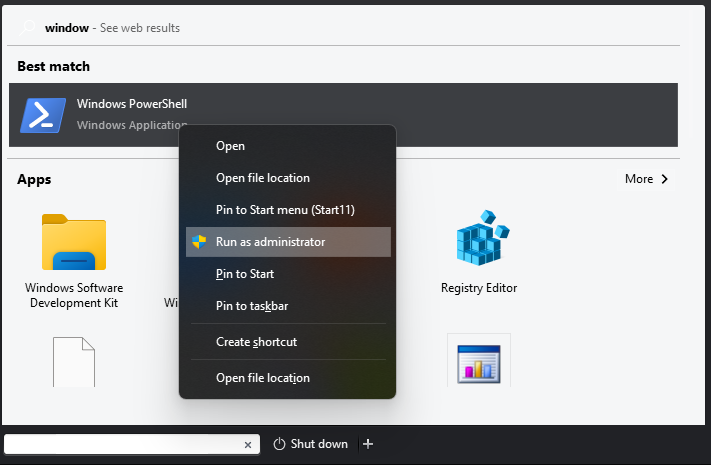
</span>**</td><td style="height: 29.8px; border-color: rgb(0, 0, 0);">1. <span class="TextRun SCXO110082575 BCX2" data-contrast="auto" lang="EN-US" style="color: windowtext; font-size: 11pt; font-family: Calibri, sans-serif; line-height: 18px;" xml:lang="EN-US">Open up Windows Powershell as an Administrator.  
      
    </span>[![image.png](https://help.basedment.org/uploads/images/gallery/2024-05/scaled-1680-/8shBiS12PrUClxqU-image.png)](https://help.basedment.org/uploads/images/gallery/2024-05/8shBiS12PrUClxqU-image.png)
    
    <span class="TextRun SCXO110082575 BCX2" data-contrast="auto" lang="EN-US" style="color: windowtext; font-size: 11pt; font-family: Calibri, sans-serif; line-height: 18px;" xml:lang="EN-US">  
    </span>
2. 

</td></tr></tbody></table>

# Audio

Adjusting audio on Windows(10/11) and how to utilize it.

# SOP Template - DO NOT USE

<table border="1" id="bkmrk-author-date-revision" style="border-collapse: collapse; width: 100%; height: 119.2px; border-width: 1px; border-color: rgb(0, 0, 0);"><colgroup><col style="width: 33.3333%;"></col><col style="width: 33.3333%;"></col><col style="width: 33.3333%;"></col></colgroup><tbody><tr style="height: 29.8px;"><td style="height: 29.8px; background-color: rgb(194, 224, 244); border-color: rgb(0, 0, 0);">**<span style="color: rgb(0, 0, 0);">Author</span>**  
</td><td style="height: 29.8px; background-color: rgb(194, 224, 244); border-color: rgb(0, 0, 0);">**<span style="color: rgb(0, 0, 0);">Date</span>**  
</td><td style="height: 29.8px; background-color: rgb(194, 224, 244); border-color: rgb(0, 0, 0);">**<span style="color: rgb(0, 0, 0);">Revision</span>**  
</td></tr><tr style="height: 29.8px;"><td style="height: 29.8px; border-color: rgb(0, 0, 0);">  
</td><td style="height: 29.8px; border-color: rgb(0, 0, 0);">  
</td></tr></tbody></table>

<table border="1" id="bkmrk-related-product-%28if-" style="border-collapse: collapse; width: 112.738%; height: 199.4px; border-width: 1px; border-color: rgb(0, 0, 0);"><colgroup><col style="width: 22.0501%;"></col><col style="width: 77.9499%;"></col></colgroup><tbody><tr style="height: 29.8px;"><td style="background-color: rgb(194, 224, 244); height: 29.8px; border-color: rgb(0, 0, 0);">**<span style="color: rgb(0, 0, 0);">Related product (if any):  
</span>**</td><td style="height: 29.8px; border-color: rgb(0, 0, 0);">  
</td></tr><tr style="height: 80.2px;"><td style="background-color: rgb(194, 224, 244); height: 80.2px; border-color: rgb(0, 0, 0);">**<span style="color: rgb(0, 0, 0);">Description:</span>**</td><td style="height: 80.2px; border-color: rgb(0, 0, 0);">  
</td></tr><tr style="height: 29.8px;"><td style="background-color: rgb(194, 224, 244); height: 29.8px; border-color: rgb(0, 0, 0);">**<span style="color: rgb(0, 0, 0);">Symptoms:  
</span>**</td><td style="height: 29.8px; border-color: rgb(0, 0, 0);">  
</td></tr><tr style="height: 29.8px;"><td style="background-color: rgb(194, 224, 244); height: 29.8px; border-color: rgb(0, 0, 0);">**<span style="color: rgb(0, 0, 0);">Cause:  
</span>**</td><td style="height: 29.8px; border-color: rgb(0, 0, 0);">  
</td></tr><tr><td style="background-color: rgb(194, 224, 244); border-color: rgb(0, 0, 0);">**<span style="color: rgb(0, 0, 0);">Files Needed:  
</span>**</td><td style="border-color: rgb(0, 0, 0);"> </td></tr><tr style="height: 29.8px;"><td style="background-color: rgb(194, 224, 244); height: 29.8px; border-color: rgb(0, 0, 0);">**<span style="color: rgb(0, 0, 0);">Steps to Correct:  
</span>**</td><td style="height: 29.8px; border-color: rgb(0, 0, 0);"></td></tr></tbody></table>

# Registry Hacks

Registry Hacks I am aware of to extend the ability of Windows.

# SOP Template - DO NOT USE

<table border="1" id="bkmrk-author-date-revision" style="border-collapse: collapse; width: 100%; height: 119.2px; border-width: 1px; border-color: rgb(0, 0, 0);"><colgroup><col style="width: 33.3333%;"></col><col style="width: 33.3333%;"></col><col style="width: 33.3333%;"></col></colgroup><tbody><tr style="height: 29.8px;"><td style="height: 29.8px; background-color: rgb(194, 224, 244); border-color: rgb(0, 0, 0);">**<span style="color: rgb(0, 0, 0);">Author</span>**  
</td><td style="height: 29.8px; background-color: rgb(194, 224, 244); border-color: rgb(0, 0, 0);">**<span style="color: rgb(0, 0, 0);">Date</span>**  
</td><td style="height: 29.8px; background-color: rgb(194, 224, 244); border-color: rgb(0, 0, 0);">**<span style="color: rgb(0, 0, 0);">Revision</span>**  
</td></tr><tr style="height: 29.8px;"><td style="height: 29.8px; border-color: rgb(0, 0, 0);">  
</td><td style="height: 29.8px; border-color: rgb(0, 0, 0);">  
</td></tr></tbody></table>

<table border="1" id="bkmrk-related-product-%28if-" style="border-collapse: collapse; width: 112.738%; height: 199.4px; border-width: 1px; border-color: rgb(0, 0, 0);"><colgroup><col style="width: 22.0501%;"></col><col style="width: 77.9499%;"></col></colgroup><tbody><tr style="height: 29.8px;"><td style="background-color: rgb(194, 224, 244); height: 29.8px; border-color: rgb(0, 0, 0);">**<span style="color: rgb(0, 0, 0);">Related product (if any):  
</span>**</td><td style="height: 29.8px; border-color: rgb(0, 0, 0);">  
</td></tr><tr style="height: 80.2px;"><td style="background-color: rgb(194, 224, 244); height: 80.2px; border-color: rgb(0, 0, 0);">**<span style="color: rgb(0, 0, 0);">Description:</span>**</td><td style="height: 80.2px; border-color: rgb(0, 0, 0);">  
</td></tr><tr style="height: 29.8px;"><td style="background-color: rgb(194, 224, 244); height: 29.8px; border-color: rgb(0, 0, 0);">**<span style="color: rgb(0, 0, 0);">Symptoms:  
</span>**</td><td style="height: 29.8px; border-color: rgb(0, 0, 0);">  
</td></tr><tr style="height: 29.8px;"><td style="background-color: rgb(194, 224, 244); height: 29.8px; border-color: rgb(0, 0, 0);">**<span style="color: rgb(0, 0, 0);">Cause:  
</span>**</td><td style="height: 29.8px; border-color: rgb(0, 0, 0);">  
</td></tr><tr><td style="background-color: rgb(194, 224, 244); border-color: rgb(0, 0, 0);">**<span style="color: rgb(0, 0, 0);">Files Needed:  
</span>**</td><td style="border-color: rgb(0, 0, 0);"> </td></tr><tr style="height: 29.8px;"><td style="background-color: rgb(194, 224, 244); height: 29.8px; border-color: rgb(0, 0, 0);">**<span style="color: rgb(0, 0, 0);">Steps to Correct:  
</span>**</td><td style="height: 29.8px; border-color: rgb(0, 0, 0);"></td></tr></tbody></table>

# How to Setup Auto Login for Windows 10 without netplwiz (non-licensed Windows 10)

<table border="1" id="bkmrk-author-date-revision" style="border-collapse: collapse; width: 100%; height: 119.2px; border-width: 1px; border-color: rgb(0, 0, 0);"><colgroup><col style="width: 33.3333%;"></col><col style="width: 33.3333%;"></col><col style="width: 33.3333%;"></col></colgroup><tbody><tr style="height: 29.8px;"><td style="height: 29.8px; background-color: rgb(194, 224, 244); border-color: rgb(0, 0, 0);">**<span style="color: rgb(0, 0, 0);">Author</span>**  
</td><td style="height: 29.8px; background-color: rgb(194, 224, 244); border-color: rgb(0, 0, 0);">**<span style="color: rgb(0, 0, 0);">Date</span>**  
</td><td style="height: 29.8px; background-color: rgb(194, 224, 244); border-color: rgb(0, 0, 0);">**<span style="color: rgb(0, 0, 0);">Revision</span>**  
</td></tr><tr style="height: 29.8px;"><td style="height: 29.8px; border-color: rgb(0, 0, 0);">Caleb Brendel  
</td><td style="height: 29.8px; border-color: rgb(0, 0, 0);">04/08/2024  
</td><td style="height: 29.8px; border-color: rgb(0, 0, 0);">1.0  
</td></tr></tbody></table>

<table border="1" id="bkmrk-related-product-%28if-" style="border-collapse: collapse; width: 112.738%; height: 251.6px; border-width: 1px; border-color: rgb(0, 0, 0);"><colgroup><col style="width: 22.0501%;"></col><col style="width: 77.9499%;"></col></colgroup><tbody><tr style="height: 29.8px;"><td style="background-color: rgb(194, 224, 244); height: 29.8px; border-color: rgb(0, 0, 0);">**<span style="color: rgb(0, 0, 0);">Related product (if any):  
</span>**</td><td style="height: 29.8px; border-color: rgb(0, 0, 0);">  
</td></tr><tr style="height: 80.2px;"><td style="background-color: rgb(194, 224, 244); height: 80.2px; border-color: rgb(0, 0, 0);">**<span style="color: rgb(0, 0, 0);">Description:</span>**</td><td style="height: 80.2px; border-color: rgb(0, 0, 0);">Registry hack meant for Windows 10/11 in cases where you don't have a copy of Windows.

Example: a Windows VM

</td></tr><tr style="height: 29.8px;"><td style="background-color: rgb(194, 224, 244); height: 29.8px; border-color: rgb(0, 0, 0);">**<span style="color: rgb(0, 0, 0);">Symptoms:  
</span>**</td><td style="height: 29.8px; border-color: rgb(0, 0, 0);">N/A  
</td></tr><tr style="height: 46.6px;"><td style="background-color: rgb(194, 224, 244); height: 46.6px; border-color: rgb(0, 0, 0);">**<span style="color: rgb(0, 0, 0);">Cause:  
</span>**</td><td style="height: 46.6px; border-color: rgb(0, 0, 0);">This is used in cases where netplwiz is unusable on Windows 10/11. This can happen if you are on an unlicensed copy of Windows. This registry hack will bypass that.  
</td></tr><tr style="height: 29.8px;"><td style="background-color: rgb(194, 224, 244); border-color: rgb(0, 0, 0); height: 29.8px;">**<span style="color: rgb(0, 0, 0);">Files Needed:  
</span>**</td><td style="border-color: rgb(0, 0, 0); height: 29.8px;">N/A</td></tr><tr style="height: 35.4px;"><td style="background-color: rgb(194, 224, 244); height: 35.4px; border-color: rgb(0, 0, 0);">**<span style="color: rgb(0, 0, 0);">Steps to Correct:  
</span>**</td><td style="height: 35.4px; border-color: rgb(0, 0, 0);">Typically people will have licensed Windows machines. It's not like they can't operate fine without the license anyway...lol. So, here is the method I use for clients when it comes to registry hacks for auto-signing into a local account on Windows 10!

Open Registry Editor by searching it in the Windows search in the bottom left of your taskbar:

[![image.png](https://help.basedment.org/uploads/images/gallery/2024-04/scaled-1680-/XiSimage.png)](https://help.basedment.org/uploads/images/gallery/2024-04/XiSimage.png)  

After opening Registry Editor, nagivate to: **HKEY\_LOCAL\_MACHINE\\SOFTWARE\\Microsoft\\Windows NT\\CurrentVersion\\Winlogon**

[![image.png](https://help.basedment.org/uploads/images/gallery/2024-04/scaled-1680-/rDfimage.png)](https://help.basedment.org/uploads/images/gallery/2024-04/rDfimage.png)

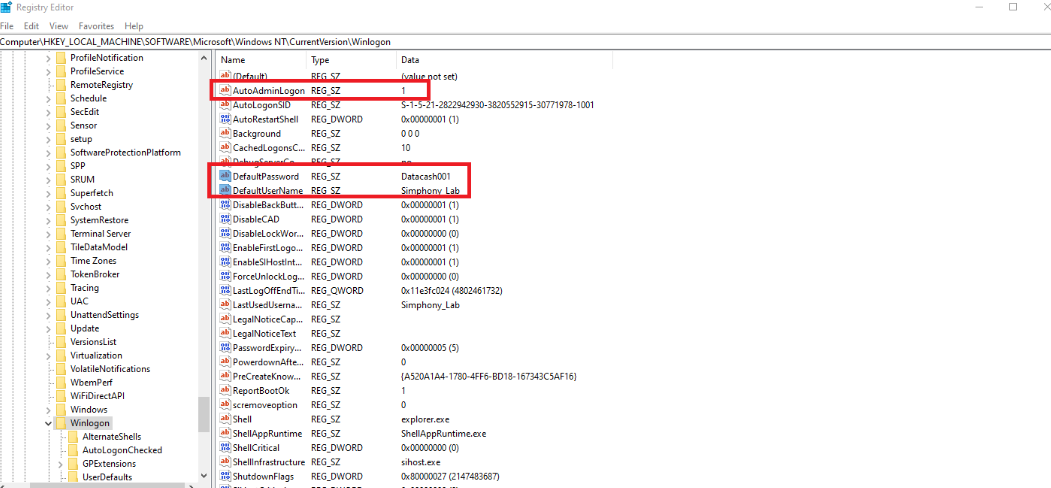
Now add 3 string values and rename them all to the following:  
1\. AutoAdminLogon (set the value on it to 1 by double-clicking on the string)  
2\. DefaultUsername (type in whatever the local username of your pc is in this string)

You can check what username you use on your pc by going into Computer Management. You can search this down below in the Windows search bar.

[![image.png](https://help.basedment.org/uploads/images/gallery/2024-04/scaled-1680-/sWqimage.png)](https://help.basedment.org/uploads/images/gallery/2024-04/sWqimage.png)

Inside of Computer Management, select Local Users and Groups.

[![image.png](https://help.basedment.org/uploads/images/gallery/2024-04/scaled-1680-/Tgiimage.png)](https://help.basedment.org/uploads/images/gallery/2024-04/Tgiimage.png)
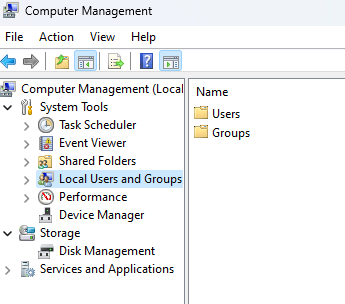
Now double click on Users.

[![image.png](https://help.basedment.org/uploads/images/gallery/2024-04/scaled-1680-/YTgimage.png)](https://help.basedment.org/uploads/images/gallery/2024-04/YTgimage.png)
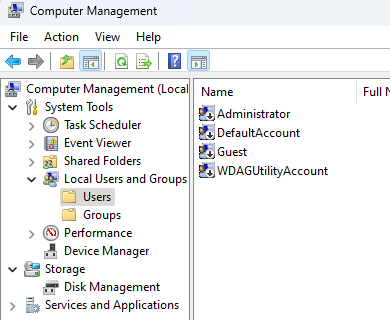
Administrator is a good example here so that's what you would end up putting in the DefaultUsername string in the Registry Editor.  
3\. DefaultPassword (type the password for whatever account you use here in this string)  
  
This is what you should have now. My username and password is different compared to yours though.

[![image.png](https://help.basedment.org/uploads/images/gallery/2024-04/scaled-1680-/iyVimage.png)](https://help.basedment.org/uploads/images/gallery/2024-04/iyVimage.png)Test by rebooting now and you should be all up &amp; working now!
</td></tr></tbody></table>

# Debloating Tools

# SOP Template - DO NOT USE

<table border="1" id="bkmrk-author-date-revision" style="border-collapse: collapse; width: 100%; height: 119.2px; border-width: 1px; border-color: rgb(0, 0, 0);"><colgroup><col style="width: 33.3333%;"></col><col style="width: 33.3333%;"></col><col style="width: 33.3333%;"></col></colgroup><tbody><tr style="height: 29.8px;"><td style="height: 29.8px; background-color: rgb(194, 224, 244); border-color: rgb(0, 0, 0);">**<span style="color: rgb(0, 0, 0);">Author</span>**  
</td><td style="height: 29.8px; background-color: rgb(194, 224, 244); border-color: rgb(0, 0, 0);">**<span style="color: rgb(0, 0, 0);">Date</span>**  
</td><td style="height: 29.8px; background-color: rgb(194, 224, 244); border-color: rgb(0, 0, 0);">**<span style="color: rgb(0, 0, 0);">Revision</span>**  
</td></tr><tr style="height: 29.8px;"><td style="height: 29.8px; border-color: rgb(0, 0, 0);">  
</td><td style="height: 29.8px; border-color: rgb(0, 0, 0);">  
</td></tr></tbody></table>

<table border="1" id="bkmrk-related-product-%28if-" style="border-collapse: collapse; width: 112.738%; height: 199.4px; border-width: 1px; border-color: rgb(0, 0, 0);"><colgroup><col style="width: 22.0501%;"></col><col style="width: 77.9499%;"></col></colgroup><tbody><tr style="height: 29.8px;"><td style="background-color: rgb(194, 224, 244); height: 29.8px; border-color: rgb(0, 0, 0);">**<span style="color: rgb(0, 0, 0);">Related product (if any):  
</span>**</td><td style="height: 29.8px; border-color: rgb(0, 0, 0);">  
</td></tr><tr style="height: 80.2px;"><td style="background-color: rgb(194, 224, 244); height: 80.2px; border-color: rgb(0, 0, 0);">**<span style="color: rgb(0, 0, 0);">Description:</span>**</td><td style="height: 80.2px; border-color: rgb(0, 0, 0);">  
</td></tr><tr style="height: 29.8px;"><td style="background-color: rgb(194, 224, 244); height: 29.8px; border-color: rgb(0, 0, 0);">**<span style="color: rgb(0, 0, 0);">Symptoms:  
</span>**</td><td style="height: 29.8px; border-color: rgb(0, 0, 0);">  
</td></tr><tr style="height: 29.8px;"><td style="background-color: rgb(194, 224, 244); height: 29.8px; border-color: rgb(0, 0, 0);">**<span style="color: rgb(0, 0, 0);">Cause:  
</span>**</td><td style="height: 29.8px; border-color: rgb(0, 0, 0);">  
</td></tr><tr><td style="background-color: rgb(194, 224, 244); border-color: rgb(0, 0, 0);">**<span style="color: rgb(0, 0, 0);">Files Needed:  
</span>**</td><td style="border-color: rgb(0, 0, 0);"> </td></tr><tr style="height: 29.8px;"><td style="background-color: rgb(194, 224, 244); height: 29.8px; border-color: rgb(0, 0, 0);">**<span style="color: rgb(0, 0, 0);">Steps to Correct:  
</span>**</td><td style="height: 29.8px; border-color: rgb(0, 0, 0);"></td></tr></tbody></table>

# Chris Titus Tech's WinUtil Powershell Script

<table border="1" id="bkmrk-author-date-revision" style="border-collapse: collapse; width: 100%; height: 119.2px; border-width: 1px; border-color: rgb(0, 0, 0);"><colgroup><col style="width: 33.3333%;"></col><col style="width: 33.3333%;"></col><col style="width: 33.3333%;"></col></colgroup><tbody><tr style="height: 29.8px;"><td style="height: 29.8px; background-color: rgb(194, 224, 244); border-color: rgb(0, 0, 0);">**<span style="color: rgb(0, 0, 0);">Author</span>**  
</td><td style="height: 29.8px; background-color: rgb(194, 224, 244); border-color: rgb(0, 0, 0);">**<span style="color: rgb(0, 0, 0);">Date</span>**  
</td><td style="height: 29.8px; background-color: rgb(194, 224, 244); border-color: rgb(0, 0, 0);">**<span style="color: rgb(0, 0, 0);">Revision</span>**  
</td></tr><tr style="height: 29.8px;"><td style="height: 29.8px; border-color: rgb(0, 0, 0);">Caleb Brendel  
</td><td style="height: 29.8px; border-color: rgb(0, 0, 0);">04/08/2024  
</td><td style="height: 29.8px; border-color: rgb(0, 0, 0);">1.0  
</td></tr></tbody></table>

<table border="1" id="bkmrk-related-product-%28if-" style="border-collapse: collapse; width: 112.738%; height: 3241.35px; border-width: 1px; border-color: rgb(0, 0, 0);"><colgroup><col style="width: 22.0501%;"></col><col style="width: 77.9499%;"></col></colgroup><tbody><tr style="height: 29.8px;"><td style="background-color: rgb(194, 224, 244); height: 29.8px; border-color: rgb(0, 0, 0);">**<span style="color: rgb(0, 0, 0);">Related product (if any):  
</span>**</td><td style="height: 29.8px; border-color: rgb(0, 0, 0);">  
</td></tr><tr style="height: 80.2px;"><td style="background-color: rgb(194, 224, 244); height: 80.2px; border-color: rgb(0, 0, 0);">**<span style="color: rgb(0, 0, 0);">Description:</span>**</td><td style="height: 80.2px; border-color: rgb(0, 0, 0);">This script is used to remove "bloatware" on Windows so it can help perform better.  
</td></tr><tr style="height: 29.8px;"><td style="background-color: rgb(194, 224, 244); height: 29.8px; border-color: rgb(0, 0, 0);">**<span style="color: rgb(0, 0, 0);">Symptoms:  
</span>**</td><td style="height: 29.8px; border-color: rgb(0, 0, 0);">  
</td></tr><tr style="height: 29.8px;"><td style="background-color: rgb(194, 224, 244); height: 29.8px; border-color: rgb(0, 0, 0);">**<span style="color: rgb(0, 0, 0);">Cause:  
</span>**</td><td style="height: 29.8px; border-color: rgb(0, 0, 0);">Wanting to remove Microsoft Store-related apps/services to improve performance on your system.</td></tr><tr style="height: 29.8px;"><td style="background-color: rgb(194, 224, 244); border-color: rgb(0, 0, 0); height: 29.8px;">**<span style="color: rgb(0, 0, 0);">Files Needed:  
</span>**</td><td style="border-color: rgb(0, 0, 0); height: 29.8px;">No files are needed except for the script to run: **irm https://christitus.com/win | iex**</td></tr><tr style="height: 3041.95px;"><td style="background-color: rgb(194, 224, 244); height: 3041.95px; border-color: rgb(0, 0, 0);">**<span style="color: rgb(0, 0, 0);">Steps to Correct:  
</span>**</td><td style="height: 3041.95px; border-color: rgb(0, 0, 0);">Hit your Windows key on your keyboard and type in powershell.

[![image.png](https://help.basedment.org/uploads/images/gallery/2024-04/scaled-1680-/yypimage.png)](https://help.basedment.org/uploads/images/gallery/2024-04/yypimage.png)  
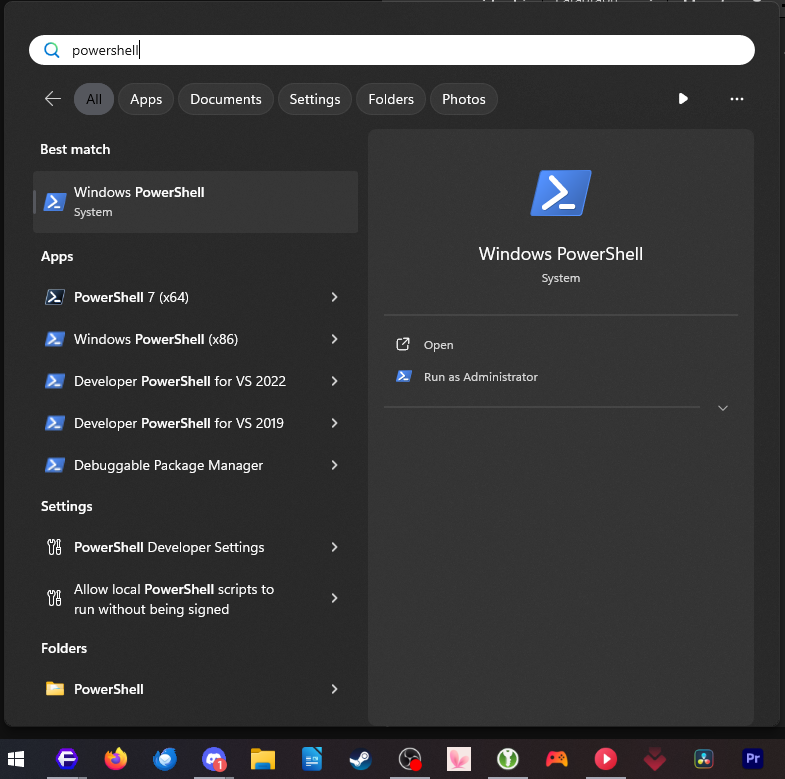
Right-click and run as administrator.

[![image.png](https://help.basedment.org/uploads/images/gallery/2024-04/scaled-1680-/gb3image.png)](https://help.basedment.org/uploads/images/gallery/2024-04/gb3image.png)  
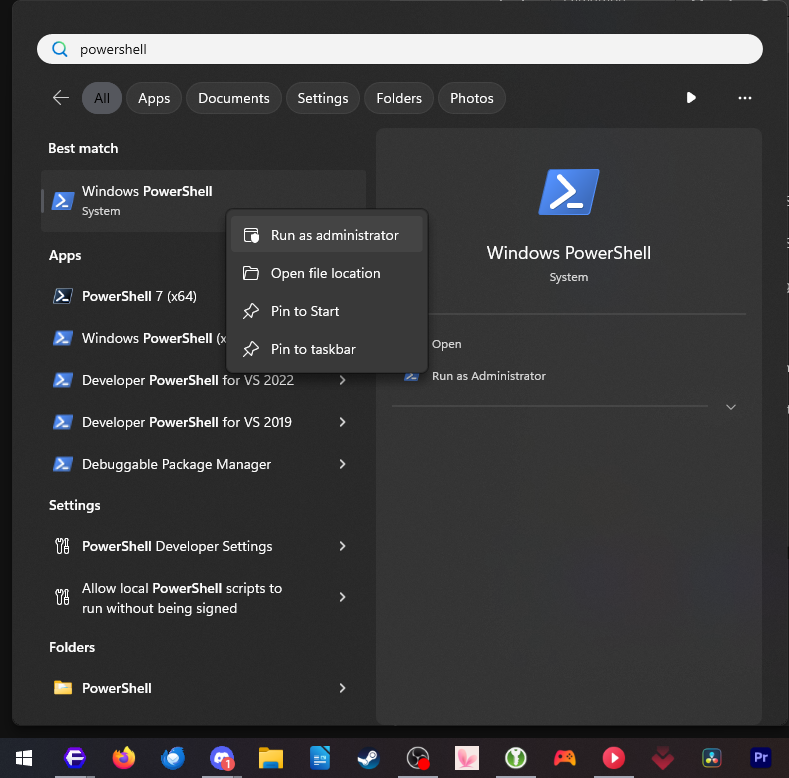
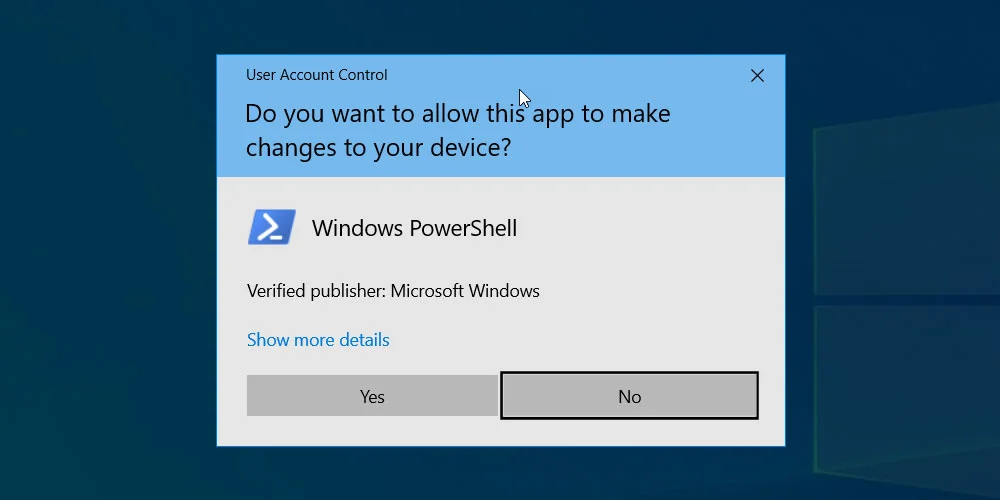
If you get a UAC prompt to allow Powershell to run, press Yes to accept it.

[![image.png](https://help.basedment.org/uploads/images/gallery/2024-04/scaled-1680-/hFZimage.png)](https://help.basedment.org/uploads/images/gallery/2024-04/hFZimage.png)  
Copy ( Ctrl +C ) the following command: **irm https://christitus.com/win | iex** Now click into Powershell and paste the command you just copied ( Ctrl + V )

[![image.png](https://help.basedment.org/uploads/images/gallery/2024-04/scaled-1680-/Ywbimage.png)](https://help.basedment.org/uploads/images/gallery/2024-04/Ywbimage.png)  
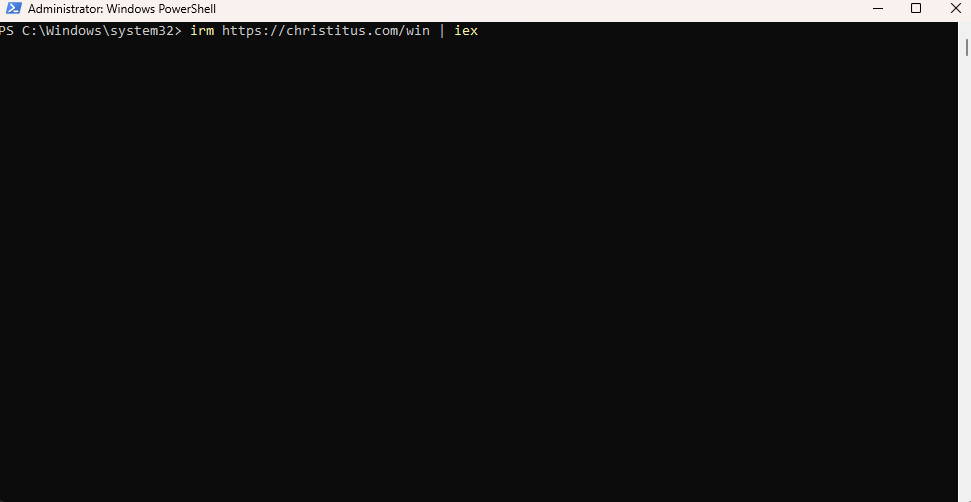
Press Enter on your keyboard now.  
The script might start to install chocolatey (a dependency for the script), and let it do its thing. If it asks any prompts, say yes to all of them.

Once the utility is opened, you should have a window like this:

[![image.png](https://help.basedment.org/uploads/images/gallery/2024-04/scaled-1680-/gbPimage.png)](https://help.basedment.org/uploads/images/gallery/2024-04/gbPimage.png)  
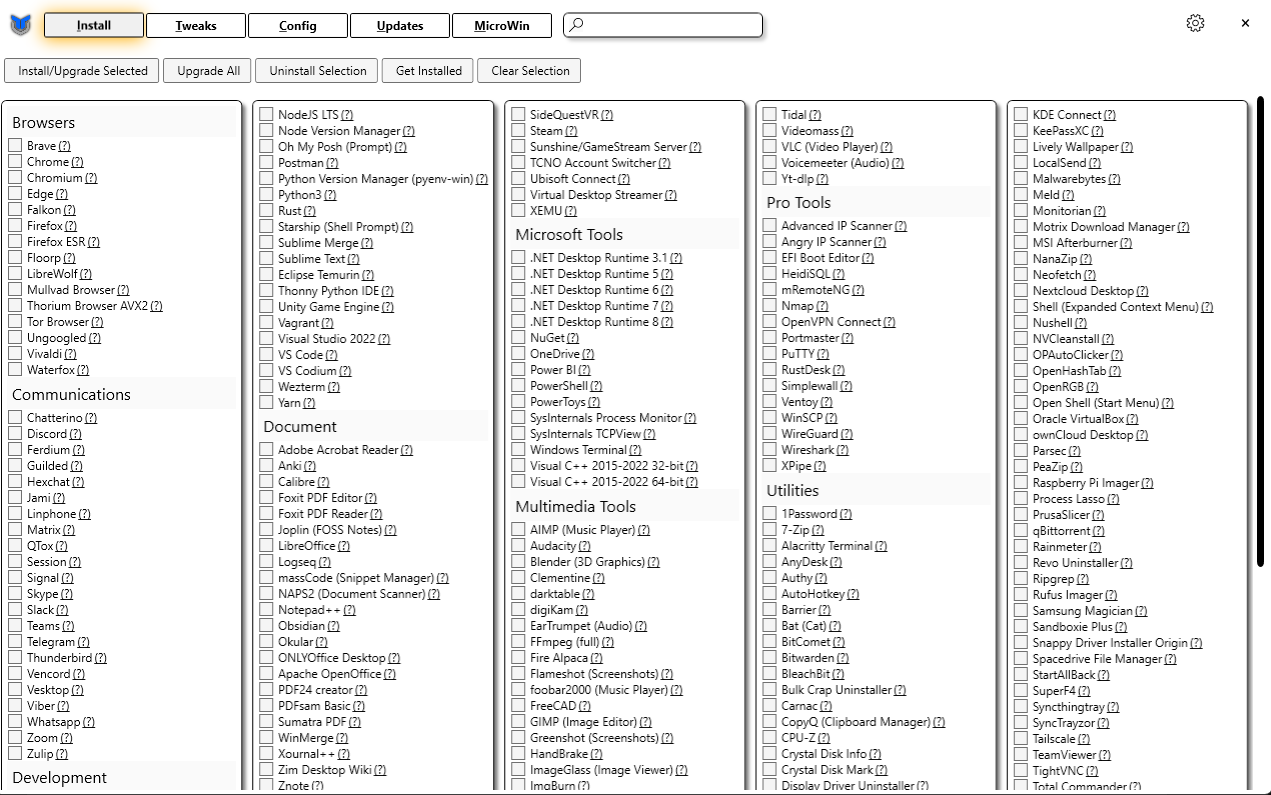
Now that we are here, let's go into the Tweaks tab in the top left of the window.

Once in here, select the options I have in the screenshot below:

[![image.png](https://help.basedment.org/uploads/images/gallery/2024-04/scaled-1680-/4zGimage.png)](https://help.basedment.org/uploads/images/gallery/2024-04/4zGimage.png)  
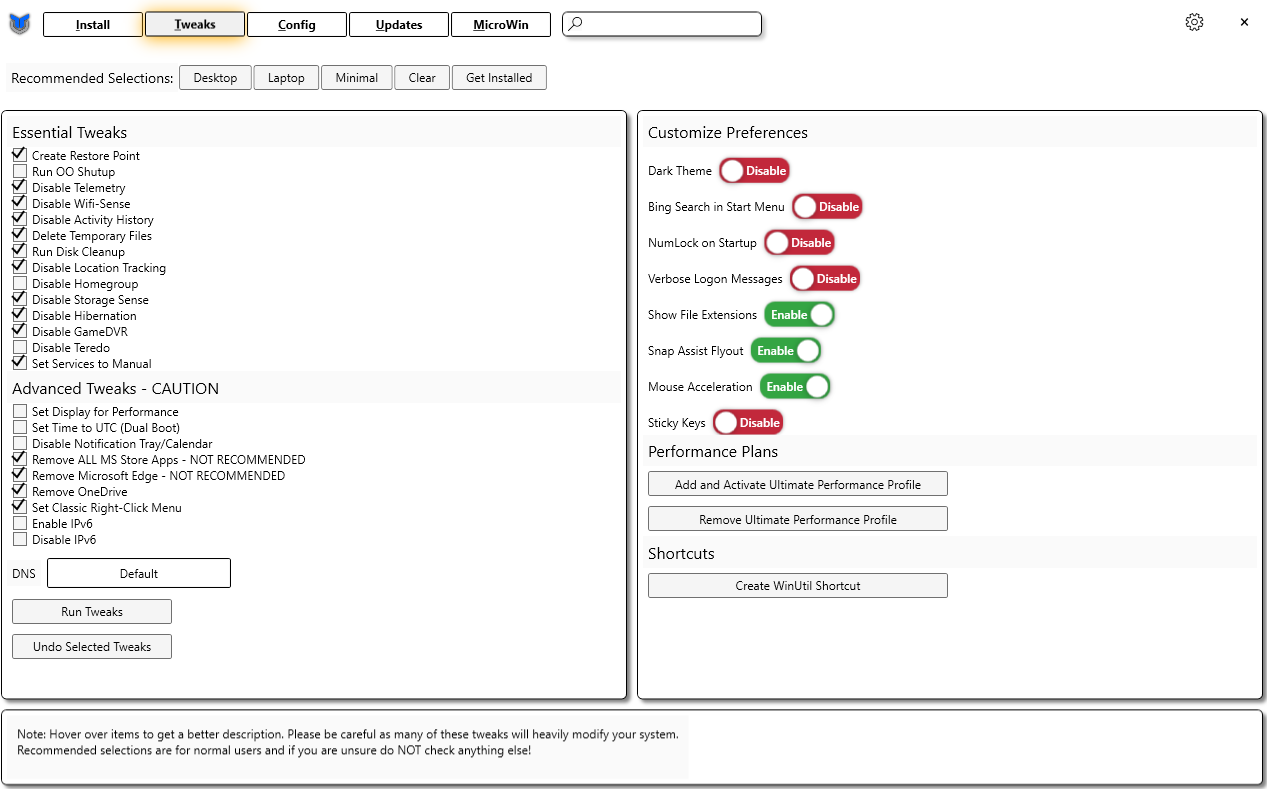
Click Run Tweaks now and let it do its thing! That's it! You're all set now and got some unnecessary tracking &amp; bloatware bs off your Windows 10/11 PC!

</td></tr></tbody></table>

# Gaming

# Baldur's Gate 3 - Party Limit Begone Mod Guide

<table border="1" id="bkmrk-baldur%27s-gate-3---pa" style="border-collapse: collapse; width: 100%; height: 4592.37px;"><colgroup><col style="width: 50.0596%;"></col><col style="width: 50.0596%;"></col></colgroup><tbody><tr style="height: 31px;"><td class="align-center" colspan="2" style="height: 31px; background-color: rgb(53, 152, 219);"><span class="TextRun SCXO179040706 BCX2" data-contrast="auto" lang="EN-US" style="color: windowtext; background-color: transparent; font-weight: normal; font-style: normal; text-decoration: none; font-size: 11pt; font-family: Calibri, sans-serif; line-height: 18px;" xml:lang="EN-US"><span class="NormalTextRun SCXO179040706 BCX2" style="background-color: inherit;"> **Baldur's Gate 3 - Party Limit Begone Mod Guide**  
</span></span></td></tr><tr style="height: 57.8px;"><td style="height: 57.8px;"><span class="TextRun SCXO179040706 BCX2" data-contrast="auto" lang="EN-US" style="color: windowtext; background-color: transparent; font-weight: normal; font-style: normal; text-decoration: none; font-size: 11pt; font-family: Calibri, sans-serif; line-height: 18px;" xml:lang="EN-US"><span class="NormalTextRun SCXO179040706 BCX2" style="background-color: inherit;">Step 1: Download the files to the right first!  
</span></span>

</td><td style="height: 57.8px;">[PartyLimitBegone.zip](https://help.basedment.org/attachments/90)

[BG3ModManager.zip](https://help.basedment.org/attachments/91)

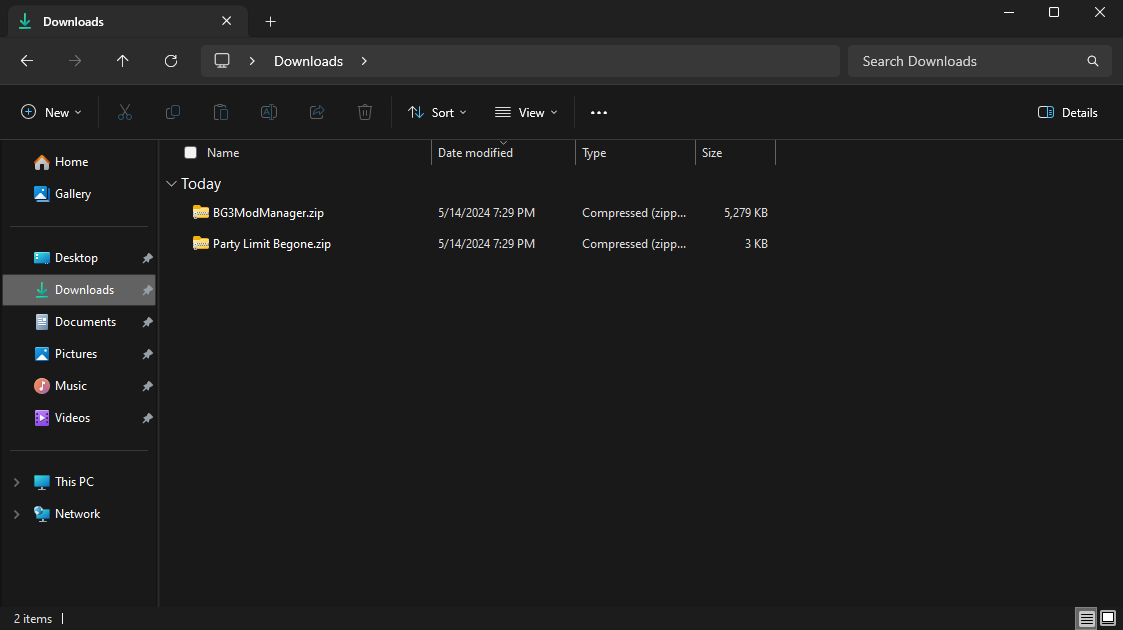
</td></tr><tr style="height: 244.5px;"><td style="height: 244.5px;"><span class="TextRun SCXO179040706 BCX2" data-contrast="auto" lang="EN-US" style="color: windowtext; background-color: transparent; font-weight: normal; font-style: normal; text-decoration: none; font-size: 11pt; font-family: Calibri, sans-serif; line-height: 18px;" xml:lang="EN-US"><span class="NormalTextRun SCXO179040706 BCX2" style="background-color: inherit;">Step 2: After downloading the files, navigate to your download folder. This should be located here:  
  
FYI, if you changed your downloads folder for your browser, it will be located in that directory.  
</span></span>

</td><td style="height: 244.5px;">[![image.png](https://help.basedment.org/uploads/images/gallery/2024-05/scaled-1680-/QPHhmCEQdA9ZUA4B-image.png)](https://help.basedment.org/uploads/images/gallery/2024-05/QPHhmCEQdA9ZUA4B-image.png)

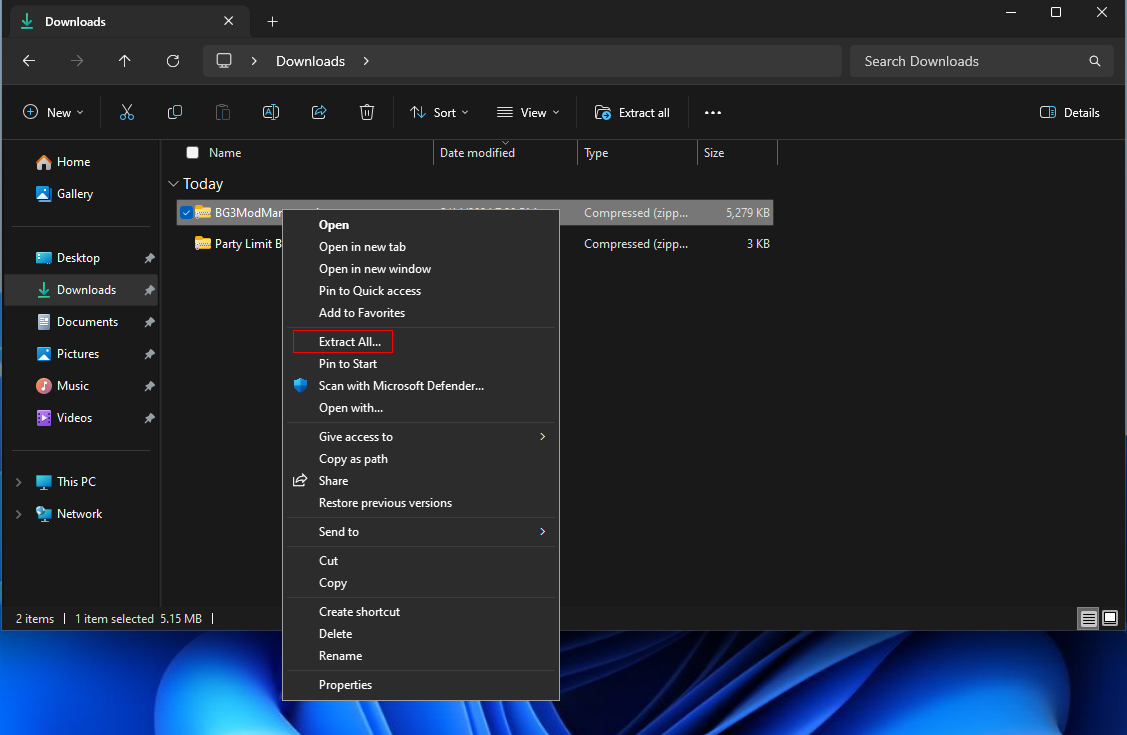
</td></tr><tr style="height: 281.2px;"><td style="height: 281.2px;"><span class="TextRun SCXO179040706 BCX2" data-contrast="auto" lang="EN-US" style="color: windowtext; background-color: transparent; font-weight: normal; font-style: normal; text-decoration: none; font-size: 11pt; font-family: Calibri, sans-serif; line-height: 18px;" xml:lang="EN-US"><span class="NormalTextRun SCXO179040706 BCX2" style="background-color: inherit;">Step 3: Right click on BG3ModManager.zip and choose **Extract All...**  
</span></span>

</td><td style="height: 281.2px;">[![image.png](https://help.basedment.org/uploads/images/gallery/2024-05/scaled-1680-/hzFdu5pc1mlL8DZM-image.png)](https://help.basedment.org/uploads/images/gallery/2024-05/hzFdu5pc1mlL8DZM-image.png)

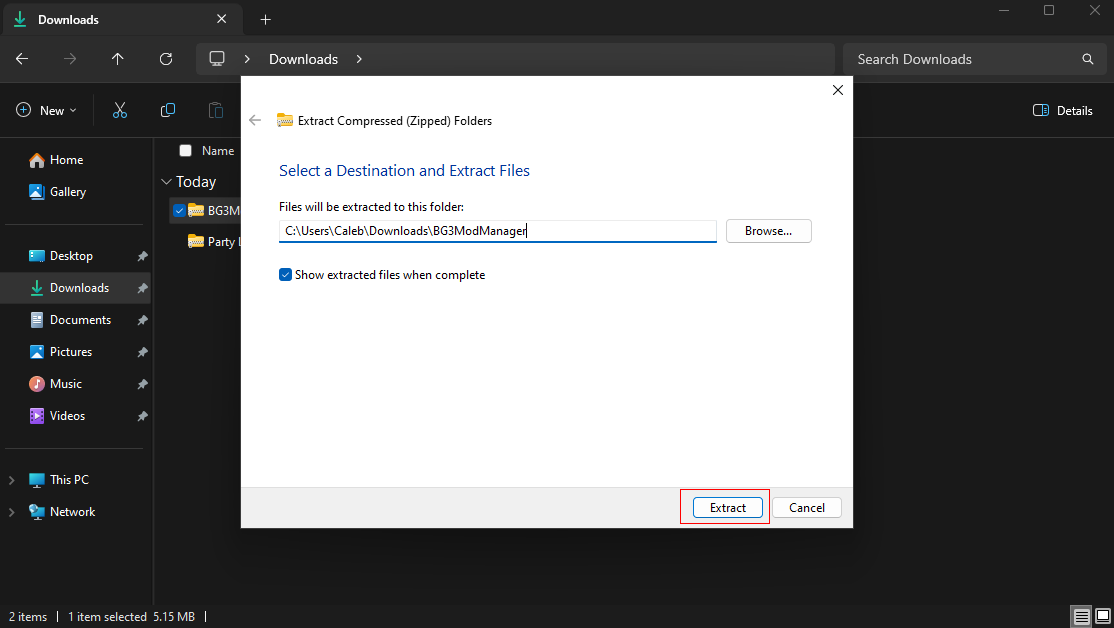
</td></tr><tr style="height: 245.6px;"><td style="height: 245.6px;"><span class="TextRun SCXO179040706 BCX2" data-contrast="auto" lang="EN-US" style="color: windowtext; background-color: transparent; font-weight: normal; font-style: normal; text-decoration: none; font-size: 11pt; font-family: Calibri, sans-serif; line-height: 18px;" xml:lang="EN-US"><span class="NormalTextRun SCXO179040706 BCX2" style="background-color: inherit;">Step 4: Click on Extract and this will extract into your Downloads folder.  
</span></span>

<span class="TextRun SCXO179040706 BCX2" data-contrast="auto" lang="EN-US" style="color: windowtext; background-color: transparent; font-weight: normal; font-style: normal; text-decoration: none; font-size: 11pt; font-family: Calibri, sans-serif; line-height: 18px;" xml:lang="EN-US"><span class="NormalTextRun SCXO179040706 BCX2" style="background-color: inherit;">Note: You can change where it extracts by clicking on **Browse...** It does not matter where you extract this to, but I would suggest keeping it simple and extracting it into your Downloads folder.  
</span></span>

</td><td style="height: 245.6px;">[![image.png](https://help.basedment.org/uploads/images/gallery/2024-05/scaled-1680-/UzWqpNY2KRCvmjoV-image.png)](https://help.basedment.org/uploads/images/gallery/2024-05/UzWqpNY2KRCvmjoV-image.png)

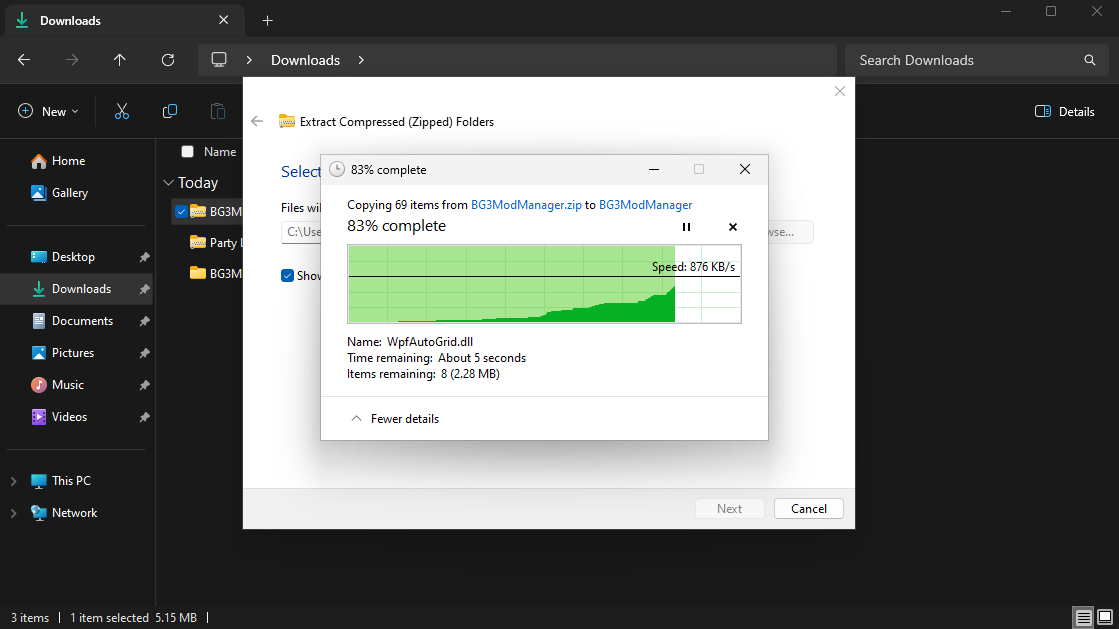
</td></tr><tr style="height: 244.933px;"><td style="height: 244.933px;"><span class="TextRun SCXO179040706 BCX2" data-contrast="auto" lang="EN-US" style="color: windowtext; background-color: transparent; font-weight: normal; font-style: normal; text-decoration: none; font-size: 11pt; font-family: Calibri, sans-serif; line-height: 18px;" xml:lang="EN-US"><span class="NormalTextRun SCXO179040706 BCX2" style="background-color: inherit;">Step 5: Wait for the files to extract.  
</span></span>

</td><td style="height: 244.933px;">[![image.png](https://help.basedment.org/uploads/images/gallery/2024-05/scaled-1680-/OyDsDHotSbXiASeX-image.png)](https://help.basedment.org/uploads/images/gallery/2024-05/OyDsDHotSbXiASeX-image.png)

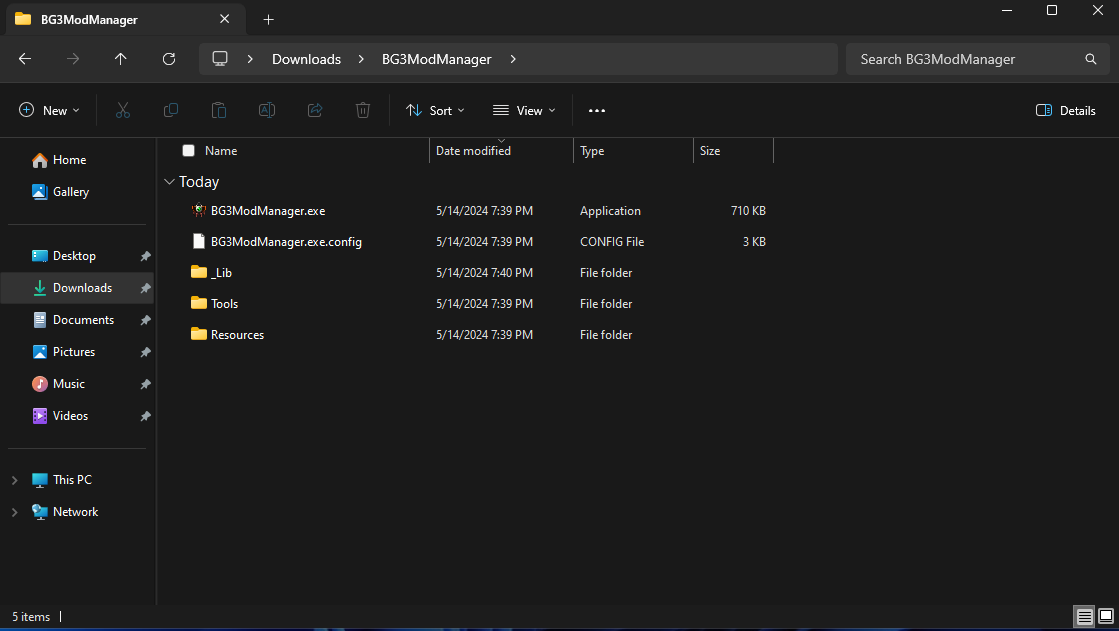
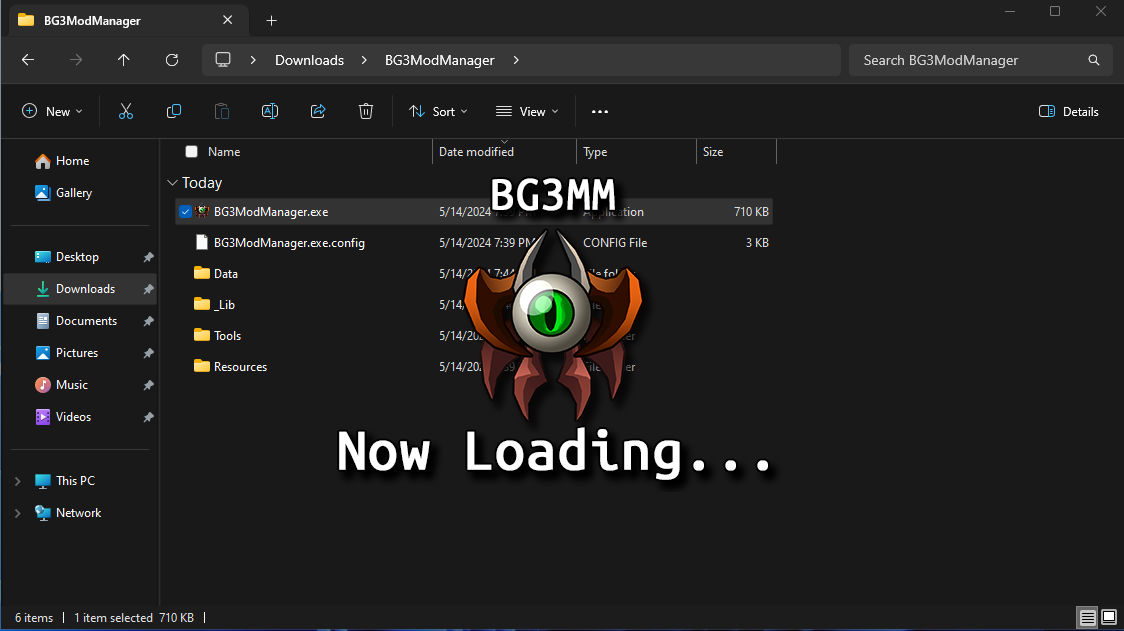
</td></tr><tr style="height: 245.667px;"><td style="height: 245.667px;"><span class="TextRun SCXO179040706 BCX2" data-contrast="auto" lang="EN-US" style="color: windowtext; background-color: transparent; font-weight: normal; font-style: normal; text-decoration: none; font-size: 11pt; font-family: Calibri, sans-serif; line-height: 18px;" xml:lang="EN-US"><span class="NormalTextRun SCXO179040706 BCX2" style="background-color: inherit;">Step 6: You will now have the folder for BG3ModManager open up.   
</span></span>

</td><td style="height: 245.667px;">[![image.png](https://help.basedment.org/uploads/images/gallery/2024-05/scaled-1680-/eDLiBjofECKyk851-image.png)](https://help.basedment.org/uploads/images/gallery/2024-05/eDLiBjofECKyk851-image.png)

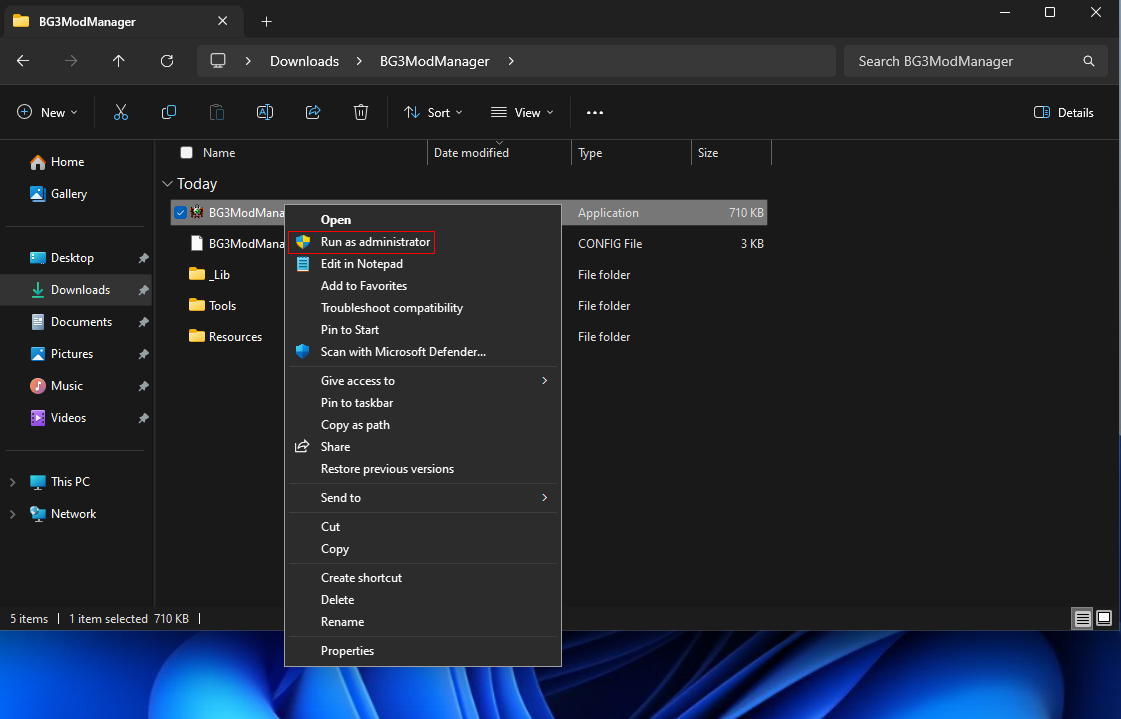
</td></tr><tr style="height: 276.85px;"><td style="height: 276.85px;"><span class="TextRun SCXO179040706 BCX2" data-contrast="auto" lang="EN-US" style="color: windowtext; background-color: transparent; font-weight: normal; font-style: normal; text-decoration: none; font-size: 11pt; font-family: Calibri, sans-serif; line-height: 18px;" xml:lang="EN-US"><span class="NormalTextRun SCXO179040706 BCX2" style="background-color: inherit;">Step 7: Right-click on BG3ModManager.exe and **Run as administrator.**  
</span></span>

</td><td style="height: 276.85px;">[![image.png](https://help.basedment.org/uploads/images/gallery/2024-05/scaled-1680-/5QJRZNrodNn84lFq-image.png)](https://help.basedment.org/uploads/images/gallery/2024-05/5QJRZNrodNn84lFq-image.png)

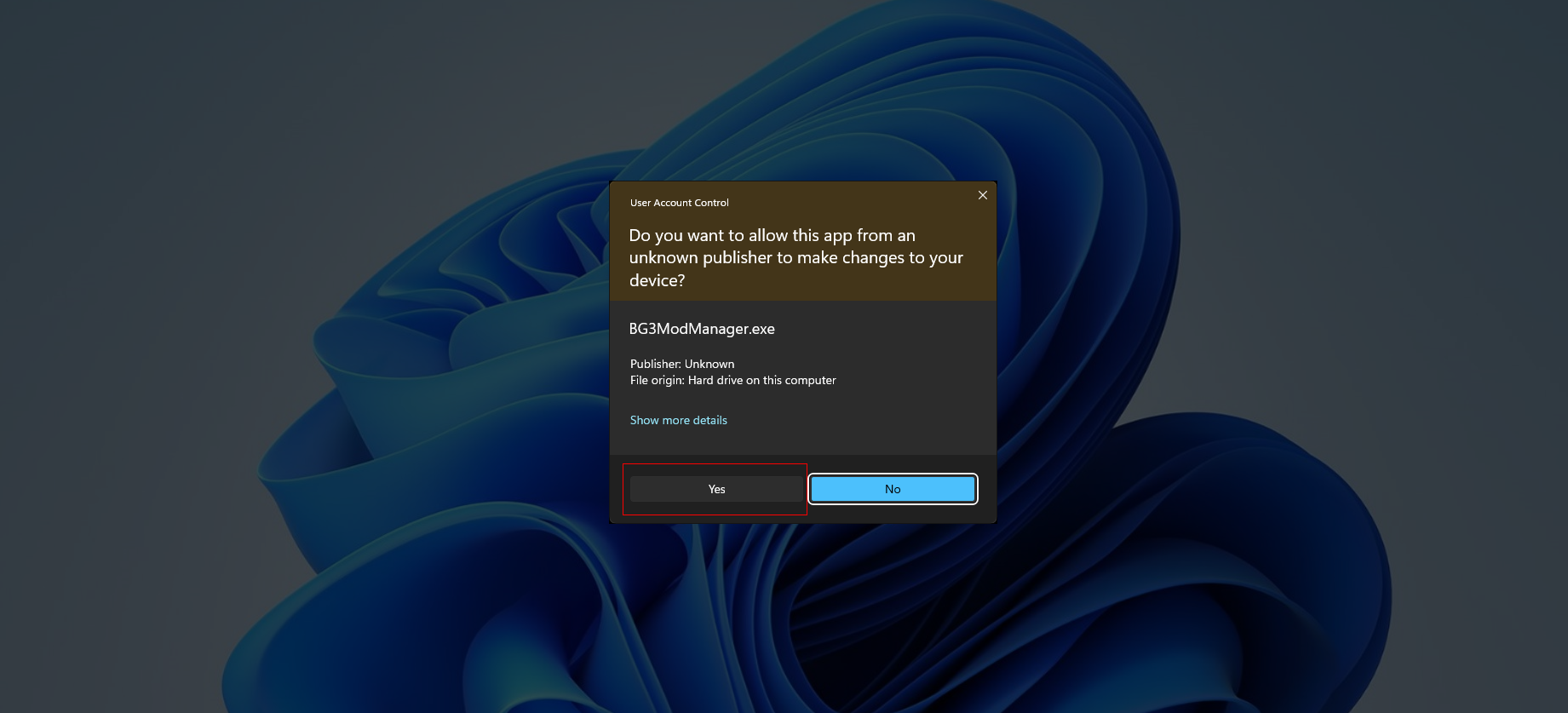
</td></tr><tr style="height: 201.683px;"><td style="height: 201.683px;"><span class="TextRun SCXO179040706 BCX2" data-contrast="auto" lang="EN-US" style="color: windowtext; background-color: transparent; font-weight: normal; font-style: normal; text-decoration: none; font-size: 11pt; font-family: Calibri, sans-serif; line-height: 18px;" xml:lang="EN-US"><span class="NormalTextRun SCXO179040706 BCX2" style="background-color: inherit;">Step 8: You will get a User Account Control prompt. Accept it by clicking on Yes.  
</span></span>

</td><td style="height: 201.683px;">[![image.png](https://help.basedment.org/uploads/images/gallery/2024-05/scaled-1680-/8I10tBJGz9jmK4Q9-image.png)](https://help.basedment.org/uploads/images/gallery/2024-05/8I10tBJGz9jmK4Q9-image.png)

</td></tr><tr style="height: 267.05px;"><td style="height: 267.05px;"><span class="TextRun SCXO179040706 BCX2" data-contrast="auto" lang="EN-US" style="color: windowtext; background-color: transparent; font-weight: normal; font-style: normal; text-decoration: none; font-size: 11pt; font-family: Calibri, sans-serif; line-height: 18px;" xml:lang="EN-US"><span class="NormalTextRun SCXO179040706 BCX2" style="background-color: inherit;">Step 9: The game should detect the path to the game folder for Steam.  
</span></span>

</td><td style="height: 267.05px;">[![image.png](https://help.basedment.org/uploads/images/gallery/2024-05/scaled-1680-/kwkafwNNhmOkRd98-image.png)](https://help.basedment.org/uploads/images/gallery/2024-05/kwkafwNNhmOkRd98-image.png)

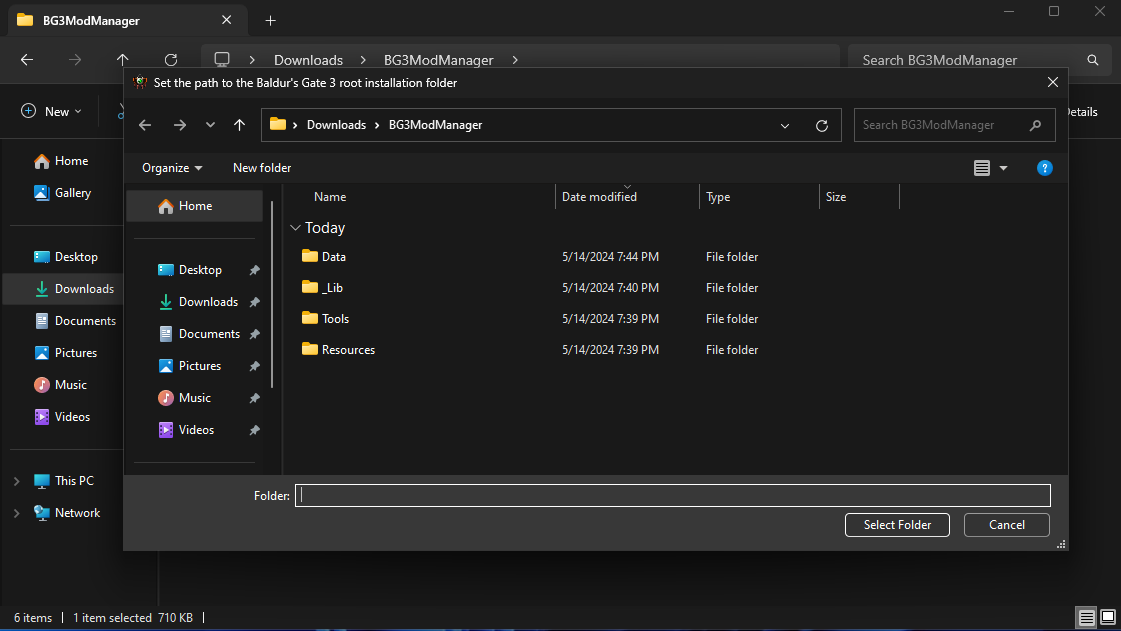
</td></tr><tr style="height: 245.25px;"><td style="height: 245.25px;"><span class="TextRun SCXO179040706 BCX2" data-contrast="auto" lang="EN-US" style="color: windowtext; background-color: transparent; font-weight: normal; font-style: normal; text-decoration: none; font-size: 11pt; font-family: Calibri, sans-serif; line-height: 18px;" xml:lang="EN-US"><span class="NormalTextRun SCXO179040706 BCX2" style="background-color: inherit;">Step 10: If the game does not detect the path to the game folder and pops up with this, navigate to your Steam games directory.  
</span></span>

</td><td style="height: 245.25px;">[![image.png](https://help.basedment.org/uploads/images/gallery/2024-05/scaled-1680-/tRPoK5e9HXe6DLUE-image.png)](https://help.basedment.org/uploads/images/gallery/2024-05/tRPoK5e9HXe6DLUE-image.png)

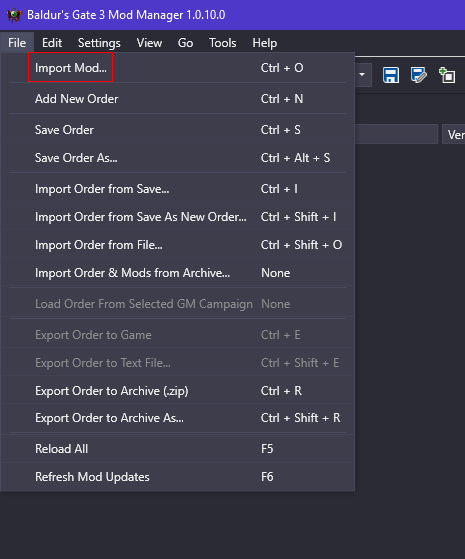
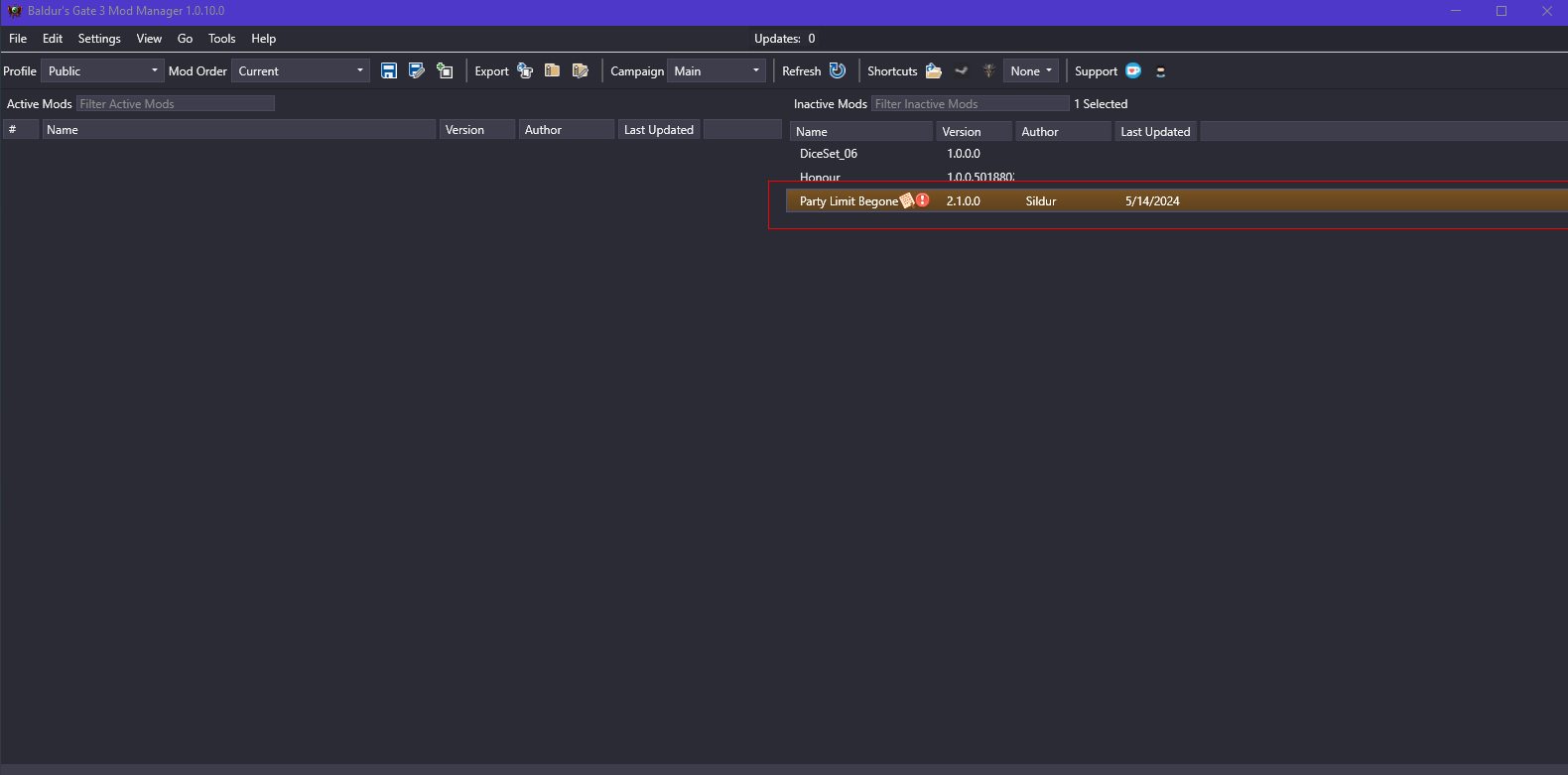
</td></tr><tr style="height: 502.55px;"><td style="height: 502.55px;"><span class="TextRun SCXO179040706 BCX2" data-contrast="auto" lang="EN-US" style="color: windowtext; background-color: transparent; font-weight: normal; font-style: normal; text-decoration: none; font-size: 11pt; font-family: Calibri, sans-serif; line-height: 18px;" xml:lang="EN-US"><span class="NormalTextRun SCXO179040706 BCX2" style="background-color: inherit;">Step 11: Now we are going to import the Party Limit Begone Mod. Click on File &gt; Import Mod...  
</span></span>

</td><td style="height: 502.55px;">[![image.png](https://help.basedment.org/uploads/images/gallery/2024-05/scaled-1680-/wlSFhp9tMfxi6vBz-image.png)](https://help.basedment.org/uploads/images/gallery/2024-05/wlSFhp9tMfxi6vBz-image.png)

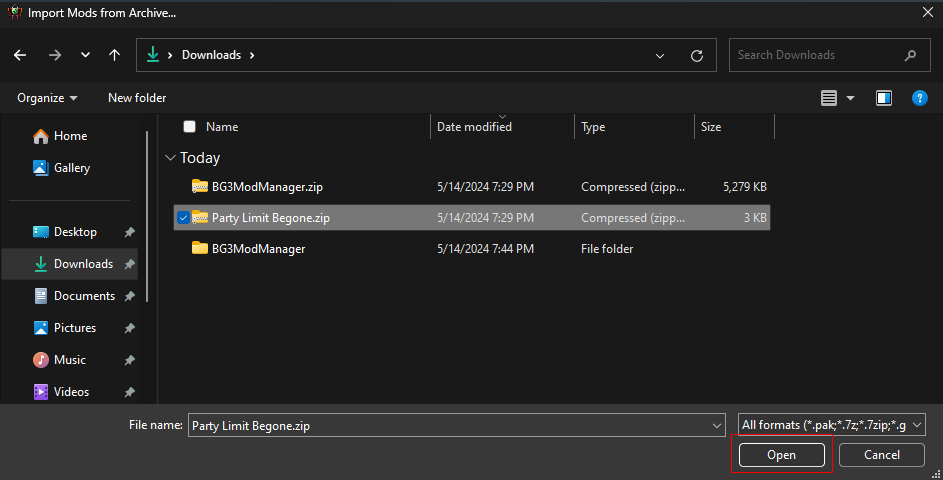
</td></tr><tr style="height: 223.567px;"><td style="height: 223.567px;"><span class="TextRun SCXO179040706 BCX2" data-contrast="auto" lang="EN-US" style="color: windowtext; background-color: transparent; font-weight: normal; font-style: normal; text-decoration: none; font-size: 11pt; font-family: Calibri, sans-serif; line-height: 18px;" xml:lang="EN-US"><span class="NormalTextRun SCXO179040706 BCX2" style="background-color: inherit;">Step 12: Navigate to your Downloads folder and choose the Party Limit Begone.zip file. Once you have clicked on the zip folder, click on Open.  
</span></span>

</td><td style="height: 223.567px;">[![image.png](https://help.basedment.org/uploads/images/gallery/2024-05/scaled-1680-/8uBAbzSPFq4b3gcG-image.png)](https://help.basedment.org/uploads/images/gallery/2024-05/8uBAbzSPFq4b3gcG-image.png)

</td></tr><tr style="height: 217.65px;"><td style="height: 217.65px;"><span class="TextRun SCXO179040706 BCX2" data-contrast="auto" lang="EN-US" style="color: windowtext; background-color: transparent; font-weight: normal; font-style: normal; text-decoration: none; font-size: 11pt; font-family: Calibri, sans-serif; line-height: 18px;" xml:lang="EN-US"><span class="NormalTextRun SCXO179040706 BCX2" style="background-color: inherit;">Step 13: Once it is done importing, confirm it imported by checking here:  
</span></span>

</td><td style="height: 217.65px;">[![image.png](https://help.basedment.org/uploads/images/gallery/2024-05/scaled-1680-/oUxCtTkNyWCkhPix-image.png)](https://help.basedment.org/uploads/images/gallery/2024-05/oUxCtTkNyWCkhPix-image.png)

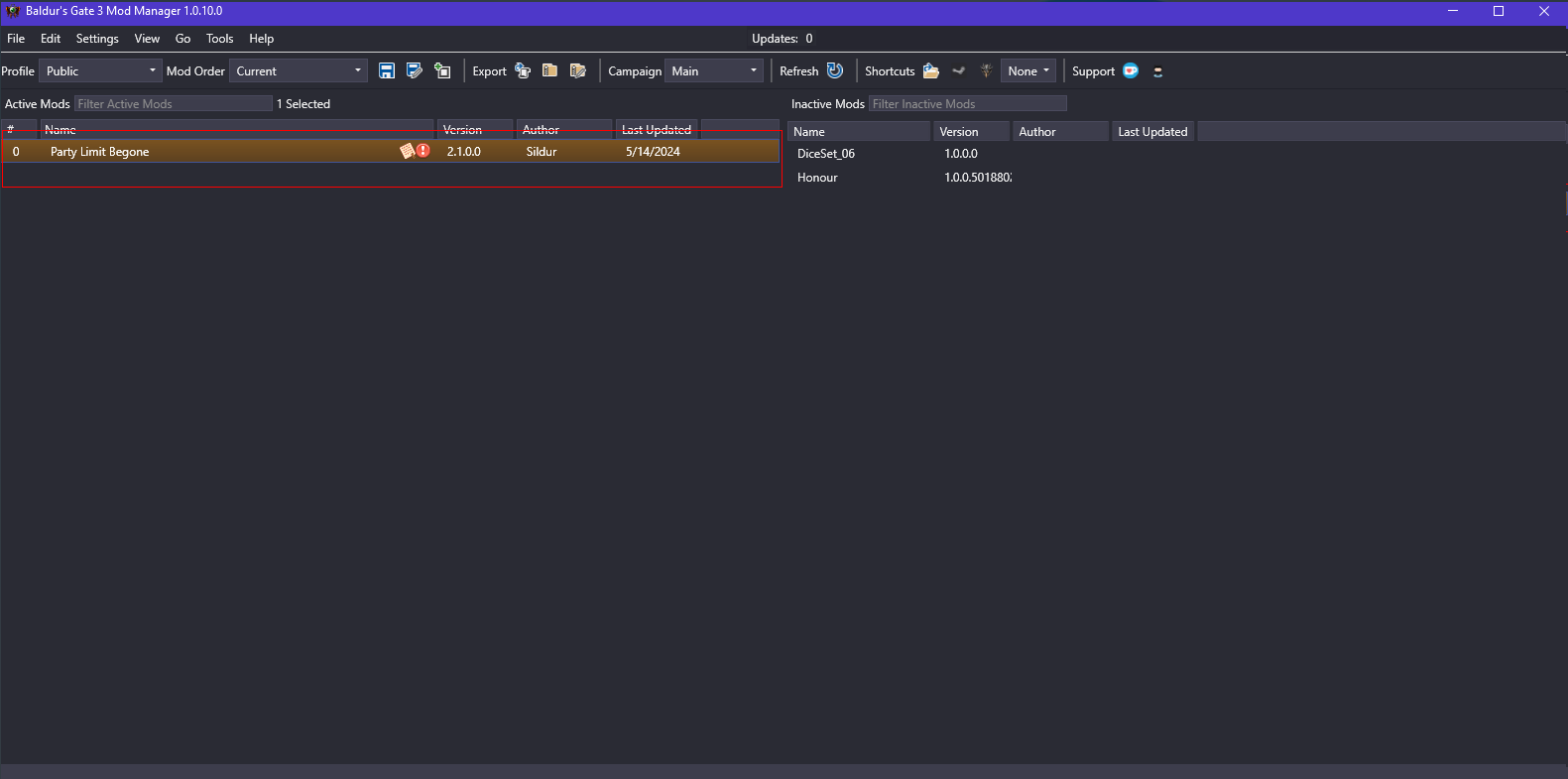
</td></tr><tr style="height: 218.533px;"><td style="height: 218.533px;"><span class="TextRun SCXO179040706 BCX2" data-contrast="auto" lang="EN-US" style="color: windowtext; background-color: transparent; font-weight: normal; font-style: normal; text-decoration: none; font-size: 11pt; font-family: Calibri, sans-serif; line-height: 18px;" xml:lang="EN-US"><span class="NormalTextRun SCXO179040706 BCX2" style="background-color: inherit;">Step 14: If it is on the right of the Mod Manager window, drag it to the left so it is in the Active Mods list.  
</span></span>

</td><td style="height: 218.533px;">[![image.png](https://help.basedment.org/uploads/images/gallery/2024-05/scaled-1680-/nYGaUpzxgkpUAs8b-image.png)](https://help.basedment.org/uploads/images/gallery/2024-05/nYGaUpzxgkpUAs8b-image.png)

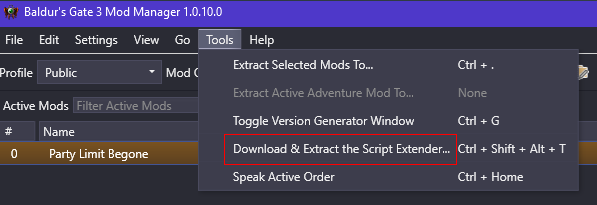
</td></tr><tr style="height: 156.9px;"><td style="height: 156.9px;"><span class="TextRun SCXO179040706 BCX2" data-contrast="auto" lang="EN-US" style="color: windowtext; background-color: transparent; font-weight: normal; font-style: normal; text-decoration: none; font-size: 11pt; font-family: Calibri, sans-serif; line-height: 18px;" xml:lang="EN-US"><span class="NormalTextRun SCXO179040706 BCX2" style="background-color: inherit;">Step 15: Next click on **Tools &gt; Download &amp; Extract the Script Extender...**  
</span></span>

</td><td style="height: 156.9px;">[![image.png](https://help.basedment.org/uploads/images/gallery/2024-05/scaled-1680-/6ZIbVbPxb23nulsw-image.png)](https://help.basedment.org/uploads/images/gallery/2024-05/6ZIbVbPxb23nulsw-image.png)

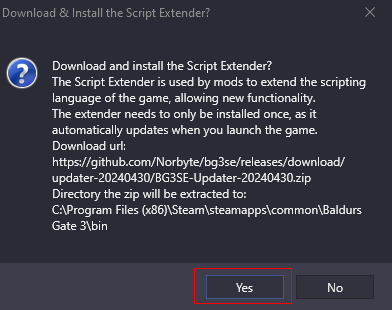
</td></tr><tr style="height: 328.7px;"><td style="height: 328.7px;"><span class="TextRun SCXO179040706 BCX2" data-contrast="auto" lang="EN-US" style="color: windowtext; background-color: transparent; font-weight: normal; font-style: normal; text-decoration: none; font-size: 11pt; font-family: Calibri, sans-serif; line-height: 18px;" xml:lang="EN-US"><span class="NormalTextRun SCXO179040706 BCX2" style="background-color: inherit;">Step 16: Confirm installing the Script Extender by clicking on Yes here.  
</span></span>

</td><td style="height: 328.7px;">[![image.png](https://help.basedment.org/uploads/images/gallery/2024-05/scaled-1680-/svCJeKcEc4QwifMF-image.png)](https://help.basedment.org/uploads/images/gallery/2024-05/svCJeKcEc4QwifMF-image.png)

</td></tr><tr style="height: 80.2px;"><td style="height: 80.2px;"><span class="TextRun SCXO179040706 BCX2" data-contrast="auto" lang="EN-US" style="color: windowtext; background-color: transparent; font-weight: normal; font-style: normal; text-decoration: none; font-size: 11pt; font-family: Calibri, sans-serif; line-height: 18px;" xml:lang="EN-US"><span class="NormalTextRun SCXO179040706 BCX2" style="background-color: inherit;">Step 17: You should get this message at the bottom left of the Mod Manager window to confirm the successful installation of Script Extender.  
</span></span>

</td><td style="height: 80.2px;">[![image.png](https://help.basedment.org/uploads/images/gallery/2024-05/scaled-1680-/hym4sKtAq1G78N0L-image.png)](https://help.basedment.org/uploads/images/gallery/2024-05/hym4sKtAq1G78N0L-image.png)

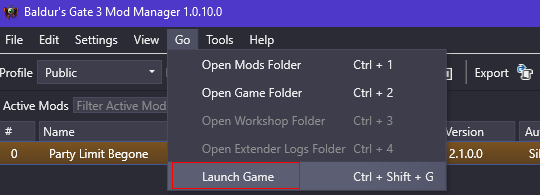
</td></tr><tr style="height: 164.033px;"><td style="height: 164.033px;"><span class="TextRun SCXO179040706 BCX2" data-contrast="auto" lang="EN-US" style="color: windowtext; background-color: transparent; font-weight: normal; font-style: normal; text-decoration: none; font-size: 11pt; font-family: Calibri, sans-serif; line-height: 18px;" xml:lang="EN-US"><span class="NormalTextRun SCXO179040706 BCX2" style="background-color: inherit;">Step 18: After this, test launching the game by clicking on Go &gt; Launch Game  
</span></span>

</td><td style="height: 164.033px;">[![image.png](https://help.basedment.org/uploads/images/gallery/2024-05/scaled-1680-/xAARwN1muDhRpSnE-image.png)](https://help.basedment.org/uploads/images/gallery/2024-05/xAARwN1muDhRpSnE-image.png)

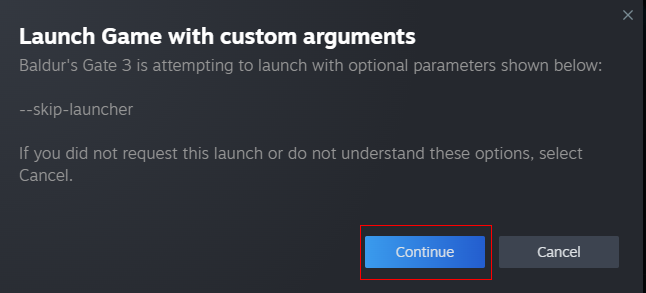
</td></tr><tr><td><span class="TextRun SCXO179040706 BCX2" data-contrast="auto" lang="EN-US" style="color: windowtext; background-color: transparent; font-weight: normal; font-style: normal; text-decoration: none; font-size: 11pt; font-family: Calibri, sans-serif; line-height: 18px;" xml:lang="EN-US"><span class="NormalTextRun SCXO179040706 BCX2" style="background-color: inherit;">Step 19: If you get this redirect popup to Steam, make sure to click **Continue.**  
</span></span>

</td><td>[![image.png](https://help.basedment.org/uploads/images/gallery/2024-05/scaled-1680-/WGM0ELxouh7oQ6jN-image.png)](https://help.basedment.org/uploads/images/gallery/2024-05/WGM0ELxouh7oQ6jN-image.png)

</td></tr><tr style="height: 358.7px;"><td style="height: 358.7px;"><span class="TextRun SCXO179040706 BCX2" data-contrast="auto" lang="EN-US" style="color: windowtext; background-color: transparent; font-weight: normal; font-style: normal; text-decoration: none; font-size: 11pt; font-family: Calibri, sans-serif; line-height: 18px;" xml:lang="EN-US"><span class="NormalTextRun SCXO179040706 BCX2" style="background-color: inherit;">Step 20: Hopefully it worked, if not, I might have to help you troubleshoot, lol.  
</span></span>

</td><td style="height: 358.7px;">[![image.png](https://help.basedment.org/uploads/images/gallery/2024-05/scaled-1680-/MGcnu5lx1UuYdRSN-image.png)](https://help.basedment.org/uploads/images/gallery/2024-05/MGcnu5lx1UuYdRSN-image.png)

</td></tr></tbody></table>

# How to Turn off Mouse Acceleration - Marvel Rivals Guide

<table border="1" id="bkmrk-baldur%27s-gate-3---pa" style="border-collapse: collapse; width: 100%; height: 4520.5px;"><colgroup><col style="width: 50.0596%;"></col><col style="width: 50.0596%;"></col></colgroup><tbody><tr style="height: 31px;"><td class="align-center" colspan="2" style="height: 31px; background-color: rgb(53, 152, 219);"><span class="TextRun SCXO179040706 BCX2" data-contrast="auto" lang="EN-US" style="color: windowtext; background-color: transparent; font-weight: normal; font-style: normal; text-decoration: none; font-size: 11pt; font-family: Calibri, sans-serif; line-height: 18px;" xml:lang="EN-US"><span class="NormalTextRun SCXO179040706 BCX2" style="background-color: inherit;"> **How to Turn off Mouse Acceleration - Marvel Rivals Guide**  
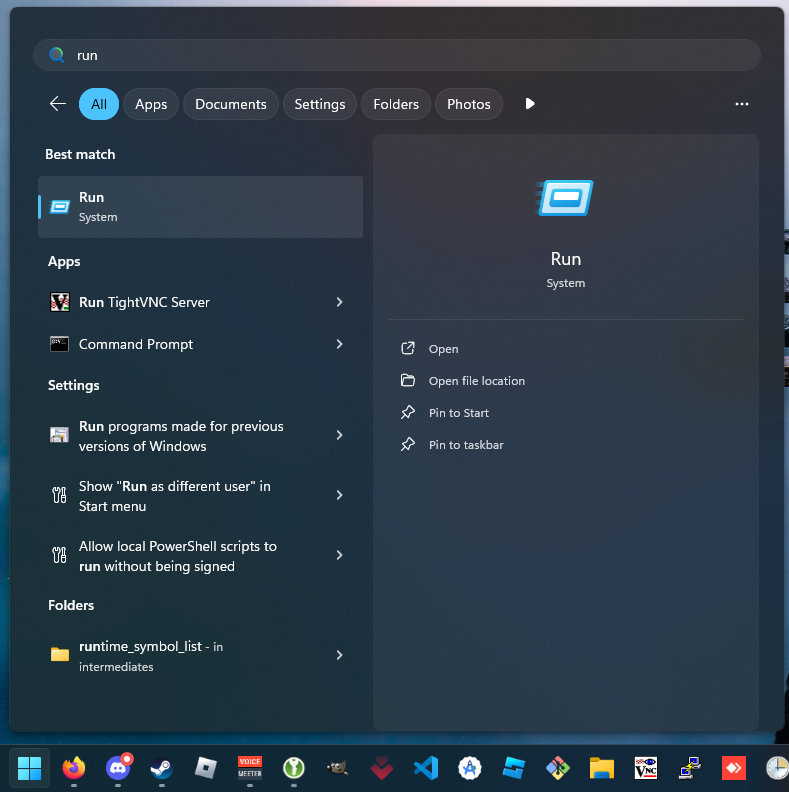
</span></span></td></tr><tr style="height: 422.717px;"><td style="height: 422.717px;"><span class="TextRun SCXO179040706 BCX2" data-contrast="auto" lang="EN-US" style="color: windowtext; background-color: transparent; font-weight: normal; font-style: normal; text-decoration: none; font-size: 11pt; font-family: Calibri, sans-serif; line-height: 18px;" xml:lang="EN-US"><span class="NormalTextRun SCXO179040706 BCX2" style="background-color: inherit;">Step 1: Tap the Windows Key on your keyboard and type in run. Open it.  
</span></span>

</td><td style="height: 422.717px;">[![{633BD78C-57C8-4581-A22D-E4205A97472C}.png](https://help.basedment.org/uploads/images/gallery/2024-12/scaled-1680-/TDtO0Lqrl7VPNraN-633bd78c-57c8-4581-a22d-e4205a97472c.png)](https://help.basedment.org/uploads/images/gallery/2024-12/TDtO0Lqrl7VPNraN-633bd78c-57c8-4581-a22d-e4205a97472c.png)

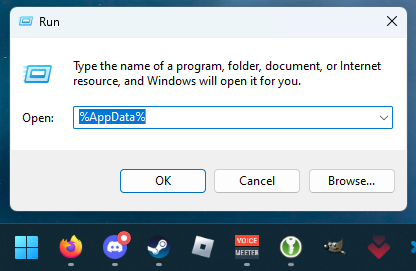
</td></tr><tr style="height: 303.3px;"><td style="height: 303.3px;"><span class="TextRun SCXO179040706 BCX2" data-contrast="auto" lang="EN-US" style="color: windowtext; background-color: transparent; font-weight: normal; font-style: normal; text-decoration: none; font-size: 11pt; font-family: Calibri, sans-serif; line-height: 18px;" xml:lang="EN-US"><span class="NormalTextRun SCXO179040706 BCX2" style="background-color: inherit;">Step 2: Type in %AppData%  
</span></span>

</td><td style="height: 303.3px;">[![{AA4A25DC-ACC7-4A4B-BE81-47A20B57DA42}.png](https://help.basedment.org/uploads/images/gallery/2024-12/scaled-1680-/lEWAoojw4oZCE1gm-aa4a25dc-acc7-4a4b-be81-47a20b57da42.png)](https://help.basedment.org/uploads/images/gallery/2024-12/lEWAoojw4oZCE1gm-aa4a25dc-acc7-4a4b-be81-47a20b57da42.png)

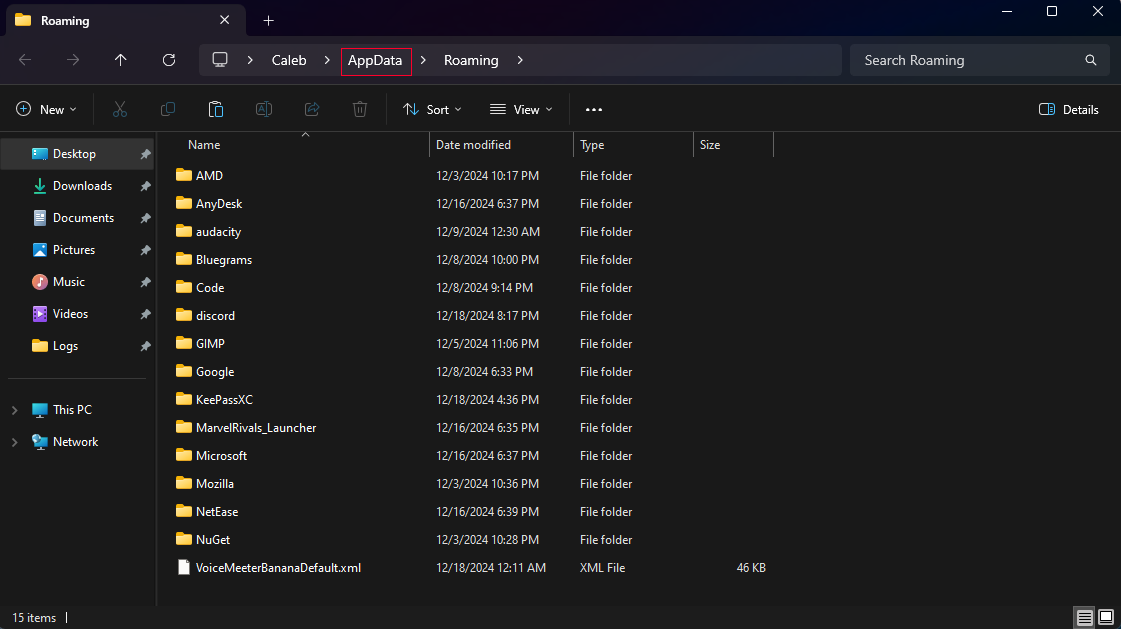
</td></tr><tr style="height: 281.2px;"><td style="height: 281.2px;"><span class="TextRun SCXO179040706 BCX2" data-contrast="auto" lang="EN-US" style="color: windowtext; background-color: transparent; font-weight: normal; font-style: normal; text-decoration: none; font-size: 11pt; font-family: Calibri, sans-serif; line-height: 18px;" xml:lang="EN-US"><span class="NormalTextRun SCXO179040706 BCX2" style="background-color: inherit;">Step 3: Navigate back a folder by clicking on AppData.  
</span></span>

</td><td style="height: 281.2px;">[![{9C06F040-3101-4FC0-B8CD-6009896B320B}.png](https://help.basedment.org/uploads/images/gallery/2024-12/scaled-1680-/IDXmRijKZqCfyfHD-9c06f040-3101-4fc0-b8cd-6009896b320b.png)](https://help.basedment.org/uploads/images/gallery/2024-12/IDXmRijKZqCfyfHD-9c06f040-3101-4fc0-b8cd-6009896b320b.png)

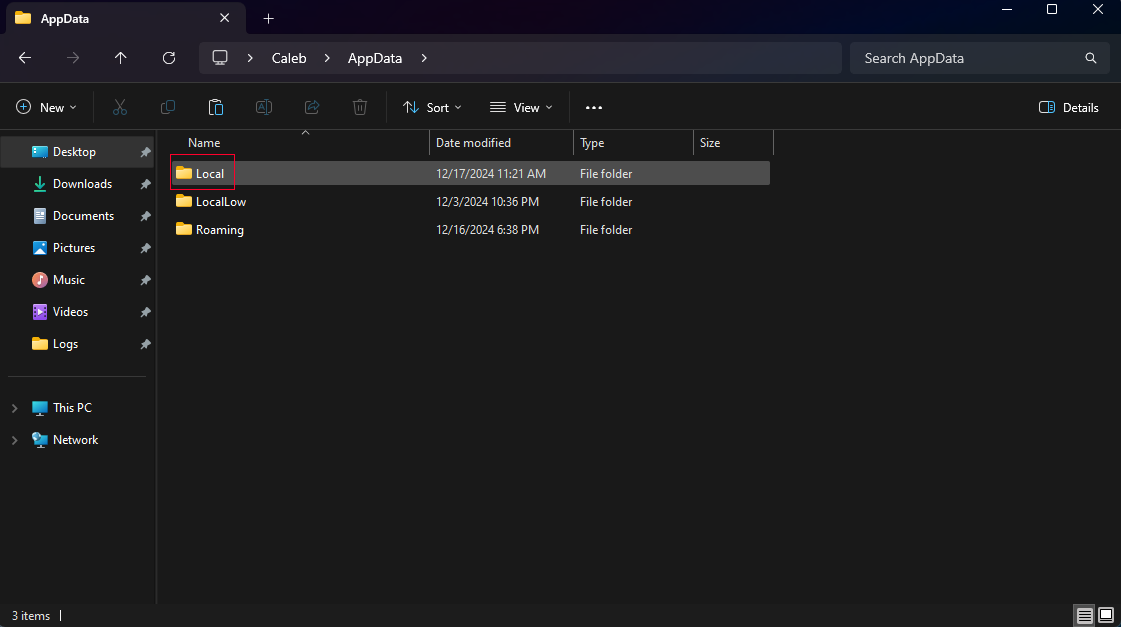
</td></tr><tr style="height: 266.217px;"><td style="height: 266.217px;"><span class="TextRun SCXO179040706 BCX2" data-contrast="auto" lang="EN-US" style="color: windowtext; background-color: transparent; font-weight: normal; font-style: normal; text-decoration: none; font-size: 11pt; font-family: Calibri, sans-serif; line-height: 18px;" xml:lang="EN-US"><span class="NormalTextRun SCXO179040706 BCX2" style="background-color: inherit;">Step 4: Click on the Local folder.  
</span></span>

</td><td style="height: 266.217px;">[![{0A4EC5F7-6592-4B84-8CF3-A01E10E04A38}.png](https://help.basedment.org/uploads/images/gallery/2024-12/scaled-1680-/uI2wrEvXHFimGT4e-0a4ec5f7-6592-4b84-8cf3-a01e10e04a38.png)](https://help.basedment.org/uploads/images/gallery/2024-12/uI2wrEvXHFimGT4e-0a4ec5f7-6592-4b84-8cf3-a01e10e04a38.png)

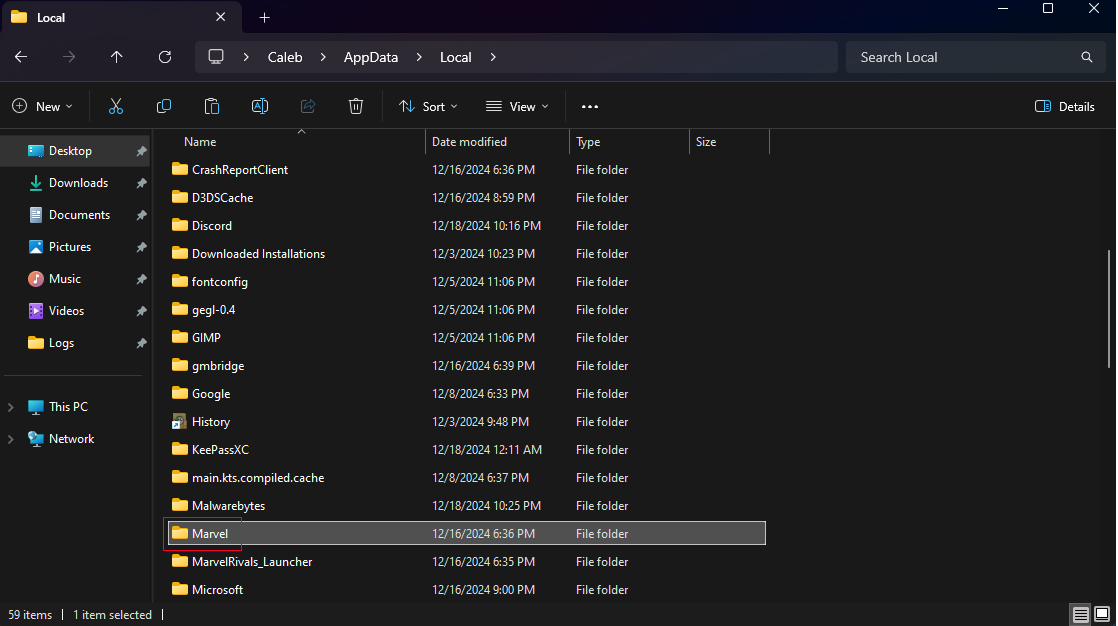
</td></tr><tr style="height: 266.467px;"><td style="height: 266.467px;"><span class="TextRun SCXO179040706 BCX2" data-contrast="auto" lang="EN-US" style="color: windowtext; background-color: transparent; font-weight: normal; font-style: normal; text-decoration: none; font-size: 11pt; font-family: Calibri, sans-serif; line-height: 18px;" xml:lang="EN-US"><span class="NormalTextRun SCXO179040706 BCX2" style="background-color: inherit;">Step 5: Scroll down and click on the Marvel folder.  
</span></span>

</td><td style="height: 266.467px;">[![{0091EB9E-3068-4E6F-A15A-6DB1056A75C5}.png](https://help.basedment.org/uploads/images/gallery/2024-12/scaled-1680-/jsS9RL16vQhUDu3R-0091eb9e-3068-4e6f-a15a-6db1056a75c5.png)](https://help.basedment.org/uploads/images/gallery/2024-12/jsS9RL16vQhUDu3R-0091eb9e-3068-4e6f-a15a-6db1056a75c5.png)

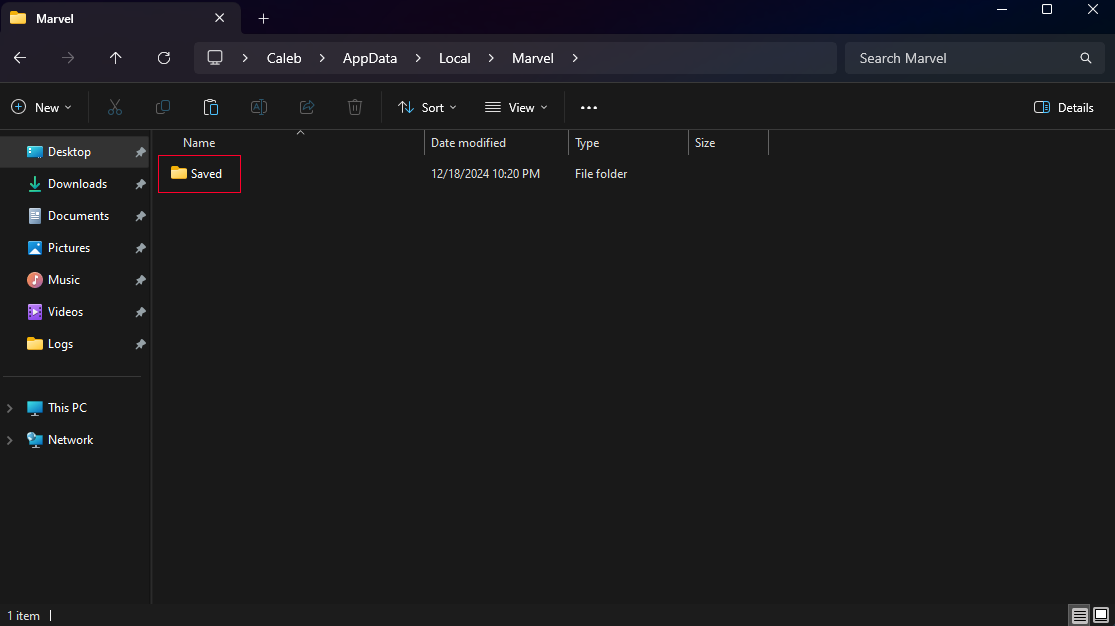
</td></tr><tr style="height: 267.067px;"><td style="height: 267.067px;"><span class="TextRun SCXO179040706 BCX2" data-contrast="auto" lang="EN-US" style="color: windowtext; background-color: transparent; font-weight: normal; font-style: normal; text-decoration: none; font-size: 11pt; font-family: Calibri, sans-serif; line-height: 18px;" xml:lang="EN-US"><span class="NormalTextRun SCXO179040706 BCX2" style="background-color: inherit;">Step 6: Click on the Saved folder.  
</span></span>

</td><td style="height: 267.067px;">[![{5991A49E-6331-4830-BC30-E53DD3303E93}.png](https://help.basedment.org/uploads/images/gallery/2024-12/scaled-1680-/ppeS9aGu8u829L4d-5991a49e-6331-4830-bc30-e53dd3303e93.png)](https://help.basedment.org/uploads/images/gallery/2024-12/ppeS9aGu8u829L4d-5991a49e-6331-4830-bc30-e53dd3303e93.png)

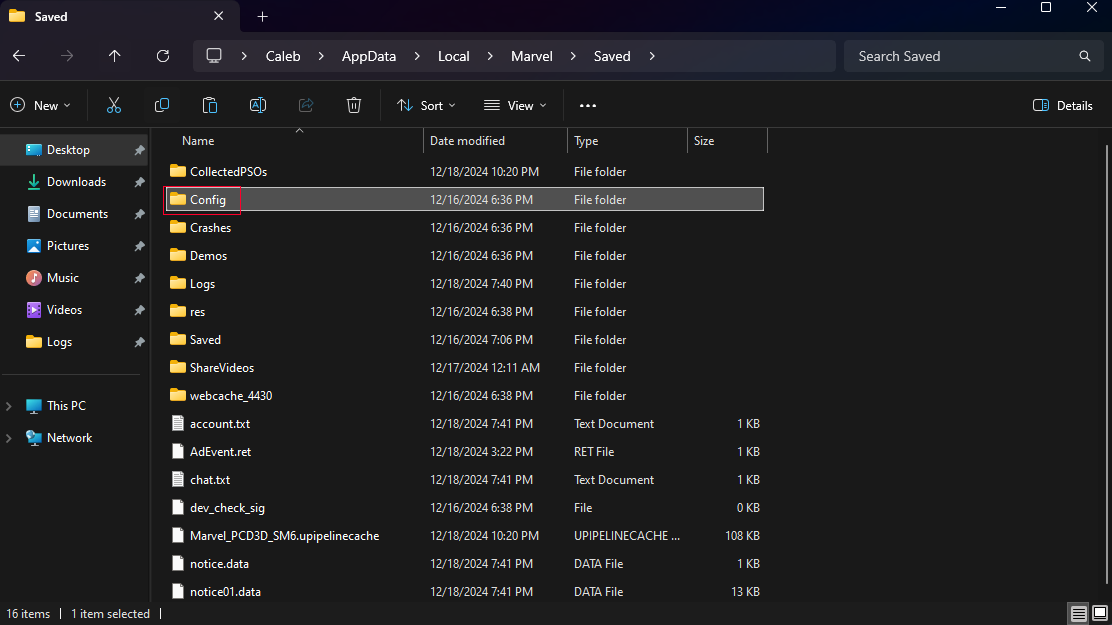
</td></tr><tr style="height: 276.85px;"><td style="height: 276.85px;"><span class="TextRun SCXO179040706 BCX2" data-contrast="auto" lang="EN-US" style="color: windowtext; background-color: transparent; font-weight: normal; font-style: normal; text-decoration: none; font-size: 11pt; font-family: Calibri, sans-serif; line-height: 18px;" xml:lang="EN-US"><span class="NormalTextRun SCXO179040706 BCX2" style="background-color: inherit;">Step 7: Click on the Config folder.  
</span></span>

</td><td style="height: 276.85px;">[![{D1BD87B4-333A-44BD-8980-6517E1902405}.png](https://help.basedment.org/uploads/images/gallery/2024-12/scaled-1680-/NP3dpbxI4Z2cTpwC-d1bd87b4-333a-44bd-8980-6517e1902405.png)](https://help.basedment.org/uploads/images/gallery/2024-12/NP3dpbxI4Z2cTpwC-d1bd87b4-333a-44bd-8980-6517e1902405.png)

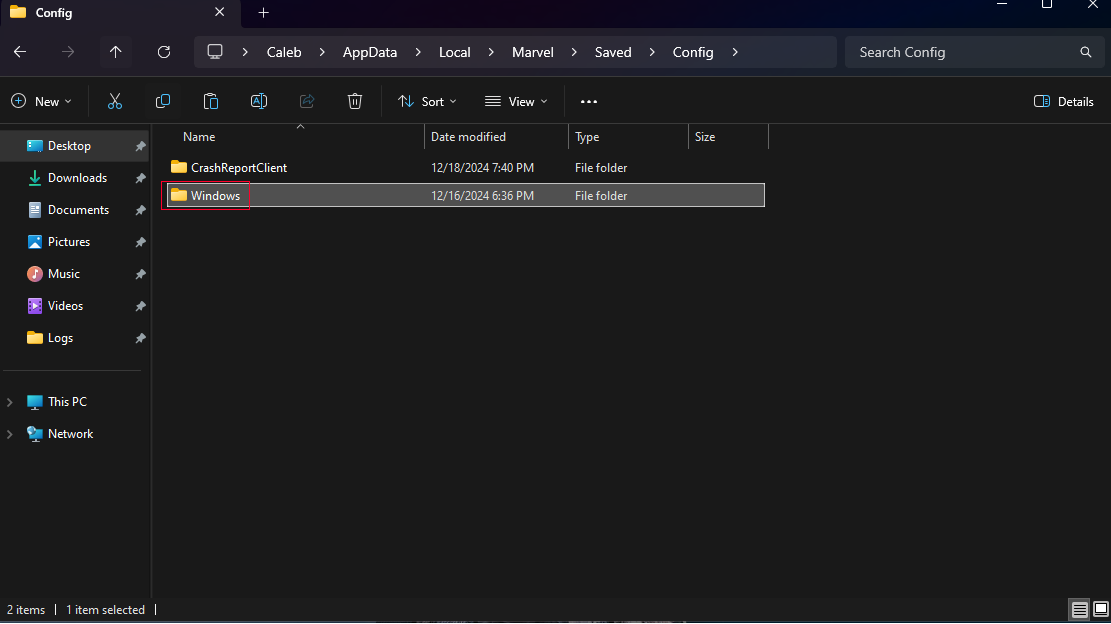
</td></tr><tr style="height: 267.15px;"><td style="height: 267.15px;"><span class="TextRun SCXO179040706 BCX2" data-contrast="auto" lang="EN-US" style="color: windowtext; background-color: transparent; font-weight: normal; font-style: normal; text-decoration: none; font-size: 11pt; font-family: Calibri, sans-serif; line-height: 18px;" xml:lang="EN-US"><span class="NormalTextRun SCXO179040706 BCX2" style="background-color: inherit;">Step 8: Click on the Windows folder.  
</span></span>

</td><td style="height: 267.15px;">[![{1F3C6D23-F0E1-46E4-AC9B-C352913FF857}.png](https://help.basedment.org/uploads/images/gallery/2024-12/scaled-1680-/DK9wk13j84qCswCE-1f3c6d23-f0e1-46e4-ac9b-c352913ff857.png)](https://help.basedment.org/uploads/images/gallery/2024-12/DK9wk13j84qCswCE-1f3c6d23-f0e1-46e4-ac9b-c352913ff857.png)

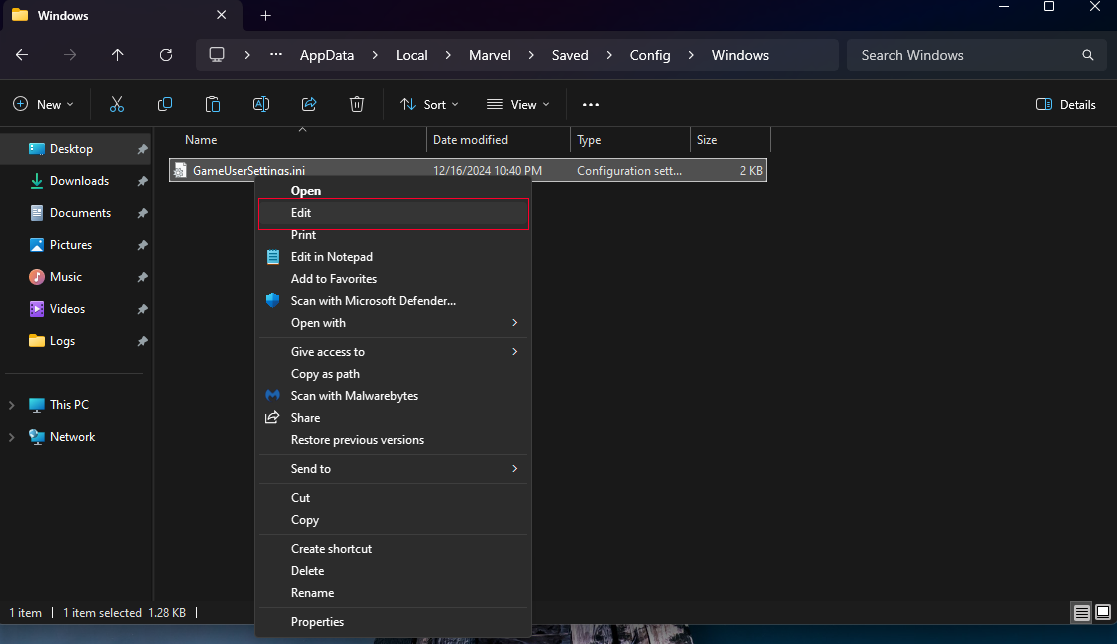
</td></tr><tr style="height: 273.15px;"><td style="height: 273.15px;"><span class="TextRun SCXO179040706 BCX2" data-contrast="auto" lang="EN-US" style="color: windowtext; background-color: transparent; font-weight: normal; font-style: normal; text-decoration: none; font-size: 11pt; font-family: Calibri, sans-serif; line-height: 18px;" xml:lang="EN-US"><span class="NormalTextRun SCXO179040706 BCX2" style="background-color: inherit;">Step 9: Right click the GameUserSettings.ini file and click on Edit.  
</span></span>

</td><td style="height: 273.15px;">[![{AACAC25A-640B-44BB-A451-84523DB1D8ED}.png](https://help.basedment.org/uploads/images/gallery/2024-12/scaled-1680-/QnKYqsqhsoMHVy2W-aacac25a-640b-44bb-a451-84523db1d8ed.png)](https://help.basedment.org/uploads/images/gallery/2024-12/QnKYqsqhsoMHVy2W-aacac25a-640b-44bb-a451-84523db1d8ed.png)

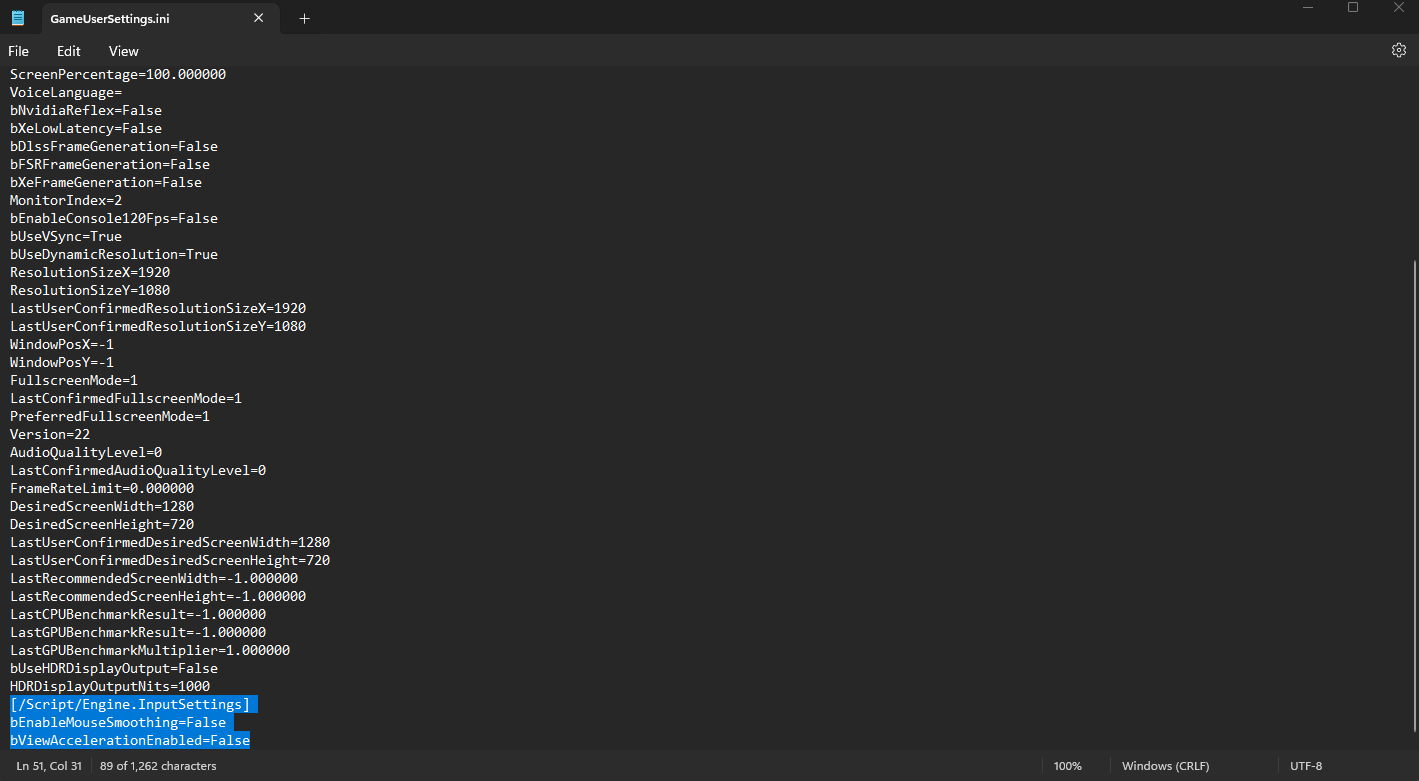
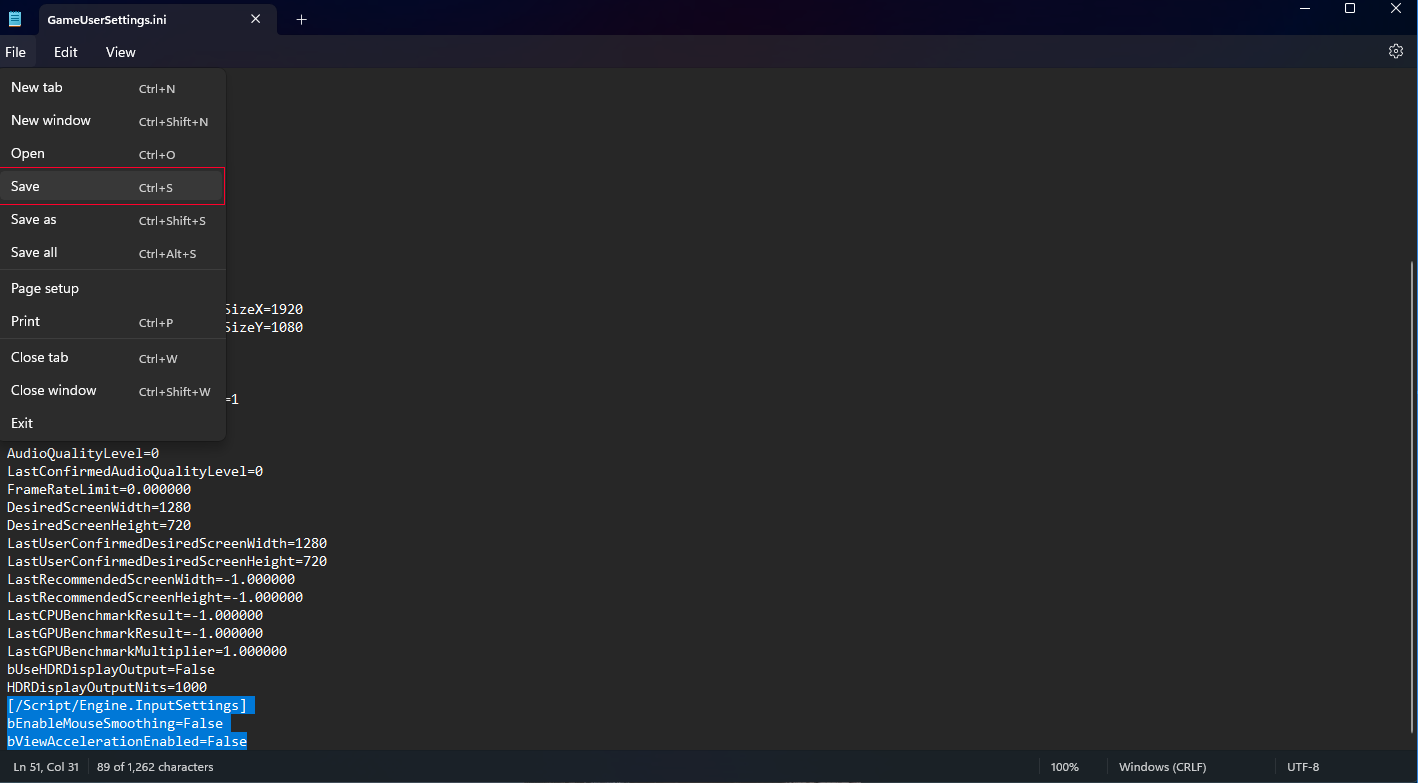
</td></tr><tr style="height: 262.617px;"><td style="height: 262.617px;"><span class="TextRun SCXO179040706 BCX2" data-contrast="auto" lang="EN-US" style="color: windowtext; background-color: transparent; font-weight: normal; font-style: normal; text-decoration: none; font-size: 11pt; font-family: Calibri, sans-serif; line-height: 18px;" xml:lang="EN-US"><span class="NormalTextRun SCXO179040706 BCX2" style="background-color: inherit;">Step 10: Scroll to the bottom of the config file and copy and paste the following text:  
</span></span>

<span class="TextRun SCXO179040706 BCX2" data-contrast="auto" lang="EN-US" style="color: windowtext; background-color: transparent; font-weight: normal; font-style: normal; text-decoration: none; font-size: 11pt; font-family: Calibri, sans-serif; line-height: 18px;" xml:lang="EN-US"><span class="NormalTextRun SCXO179040706 BCX2" style="background-color: inherit;">\[/Script/Engine.InputSettings\]  
bEnableMouseSmoothing=False  
bViewAccelerationEnabled=False</span></span>

</td><td style="height: 262.617px;">[![{EEF33105-63CC-404D-9EA8-F03D747C8D22}.png](https://help.basedment.org/uploads/images/gallery/2024-12/scaled-1680-/6wBgsHmScUB0cGcb-eef33105-63cc-404d-9ea8-f03d747c8d22.png)](https://help.basedment.org/uploads/images/gallery/2024-12/6wBgsHmScUB0cGcb-eef33105-63cc-404d-9ea8-f03d747c8d22.png)

</td></tr><tr style="height: 502.55px;"><td style="height: 502.55px;"><span class="TextRun SCXO179040706 BCX2" data-contrast="auto" lang="EN-US" style="color: windowtext; background-color: transparent; font-weight: normal; font-style: normal; text-decoration: none; font-size: 11pt; font-family: Calibri, sans-serif; line-height: 18px;" xml:lang="EN-US"><span class="NormalTextRun SCXO179040706 BCX2" style="background-color: inherit;">Step 11: Save the config file and close the Notepad window.  
</span></span>

</td><td style="height: 502.55px;">[![{93126489-72E9-4DD6-AEBF-E90A05E6DC7D}.png](https://help.basedment.org/uploads/images/gallery/2024-12/scaled-1680-/Tm3q8FI6C96paB2u-93126489-72e9-4dd6-aebf-e90a05e6dc7d.png)](https://help.basedment.org/uploads/images/gallery/2024-12/Tm3q8FI6C96paB2u-93126489-72e9-4dd6-aebf-e90a05e6dc7d.png)

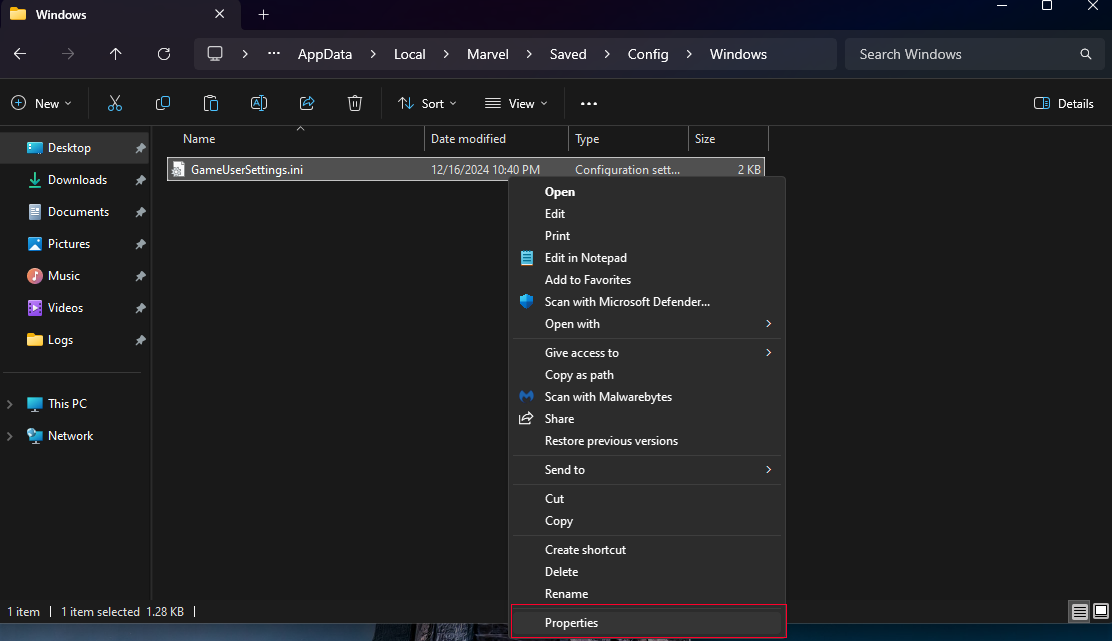
</td></tr><tr style="height: 273.1px;"><td style="height: 273.1px;"><span class="TextRun SCXO179040706 BCX2" data-contrast="auto" lang="EN-US" style="color: windowtext; background-color: transparent; font-weight: normal; font-style: normal; text-decoration: none; font-size: 11pt; font-family: Calibri, sans-serif; line-height: 18px;" xml:lang="EN-US"><span class="NormalTextRun SCXO179040706 BCX2" style="background-color: inherit;">Step 12: Right click the GameUserSettings.ini file again and click on Properties.  
</span></span>

</td><td style="height: 273.1px;">[![{E7920D8B-1678-4029-A947-0AA353FB1170}.png](https://help.basedment.org/uploads/images/gallery/2024-12/scaled-1680-/qIcZyYxkbHwA9L7R-e7920d8b-1678-4029-a947-0aa353fb1170.png)](https://help.basedment.org/uploads/images/gallery/2024-12/qIcZyYxkbHwA9L7R-e7920d8b-1678-4029-a947-0aa353fb1170.png)

</td></tr><tr style="height: 265.467px;"><td style="height: 265.467px;"><span class="TextRun SCXO179040706 BCX2" data-contrast="auto" lang="EN-US" style="color: windowtext; background-color: transparent; font-weight: normal; font-style: normal; text-decoration: none; font-size: 11pt; font-family: Calibri, sans-serif; line-height: 18px;" xml:lang="EN-US"><span class="NormalTextRun SCXO179040706 BCX2" style="background-color: inherit;">Step 13: Turn on the "Read-only" attribute at the bottom of the popup.   
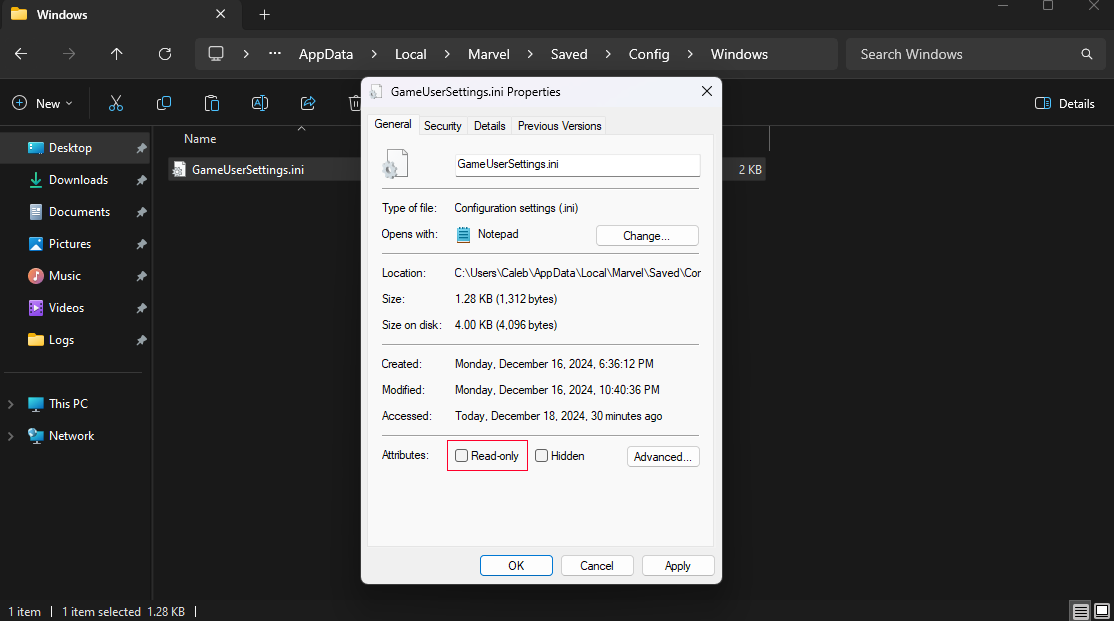
</span></span>

</td><td style="height: 265.467px;">[![{7862A3BA-5CEF-4DAA-81BE-1860225BF75F}.png](https://help.basedment.org/uploads/images/gallery/2024-12/scaled-1680-/DYFVwCkmBQHrodkQ-7862a3ba-5cef-4daa-81be-1860225bf75f.png)](https://help.basedment.org/uploads/images/gallery/2024-12/DYFVwCkmBQHrodkQ-7862a3ba-5cef-4daa-81be-1860225bf75f.png)

</td></tr><tr style="height: 266.75px;"><td style="height: 266.75px;"><span class="TextRun SCXO179040706 BCX2" data-contrast="auto" lang="EN-US" style="color: windowtext; background-color: transparent; font-weight: normal; font-style: normal; text-decoration: none; font-size: 11pt; font-family: Calibri, sans-serif; line-height: 18px;" xml:lang="EN-US"><span class="NormalTextRun SCXO179040706 BCX2" style="background-color: inherit;">Step 14: Now click on Apply in the bottom right side and click OK.  
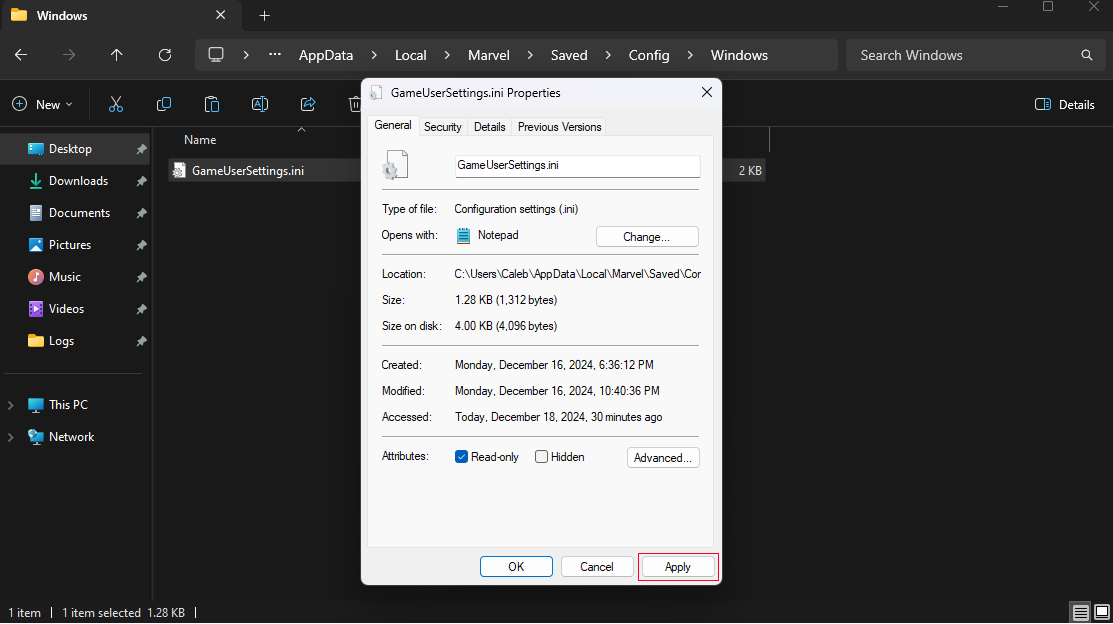
</span></span>

</td><td style="height: 266.75px;">[![{36E7774E-D7CA-4568-BFF8-320B4E2A518E}.png](https://help.basedment.org/uploads/images/gallery/2024-12/scaled-1680-/YOjJbjhlgjtJSwGn-36e7774e-d7ca-4568-bff8-320b4e2a518e.png)](https://help.basedment.org/uploads/images/gallery/2024-12/YOjJbjhlgjtJSwGn-36e7774e-d7ca-4568-bff8-320b4e2a518e.png)

</td></tr><tr style="height: 156.9px;"><td style="height: 156.9px;"><span class="TextRun SCXO179040706 BCX2" data-contrast="auto" lang="EN-US" style="color: windowtext; background-color: transparent; font-weight: normal; font-style: normal; text-decoration: none; font-size: 11pt; font-family: Calibri, sans-serif; line-height: 18px;" xml:lang="EN-US"><span class="NormalTextRun SCXO179040706 BCX2" style="background-color: inherit;">Step 15: That's it! You are done and ready to play the game! The reason why you make it read-only is so Marvel Rivals dev's don't undo what you just did! :)  
</span></span>

</td><td style="height: 156.9px;">[![Smiley.svg.png](https://help.basedment.org/uploads/images/gallery/2024-12/scaled-1680-/rIXme9JWr4trBga9-smiley-svg.png)](https://help.basedment.org/uploads/images/gallery/2024-12/rIXme9JWr4trBga9-smiley-svg.png)

</td></tr></tbody></table>