Skip to main content
Troubleshooting Tips & Tricks - Day 1 of Troubleshooting Scenarios
Before anything else, if you are reviewing this helpful training article, please check out the first link right below here.
Scenario #1 - The WiFi Works; Except for When It Doesn't
"Bonnie reports that her laptop keeps losing internet connection during video calls, but browsing websites usually works fine. Other devices in the house seem okay."
ⓘ Solutions for this scenario are suggested from the study group below.
ⓘ Solutions will also be put under comments under this page as well as a team-building and homework exercise!
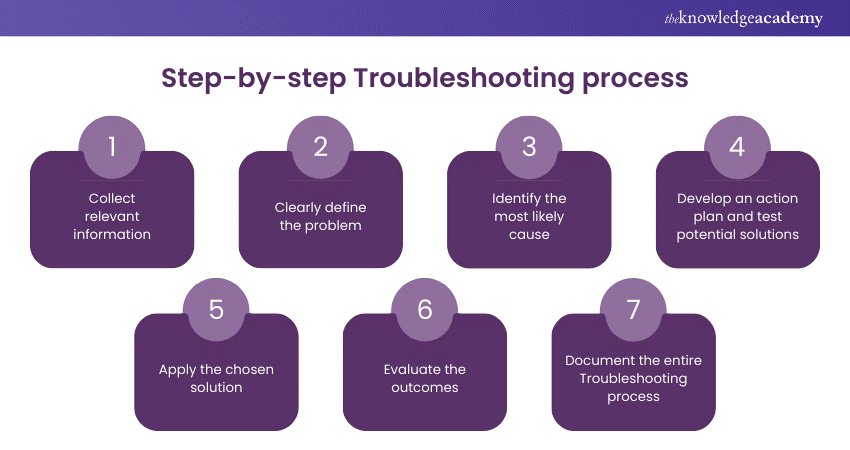
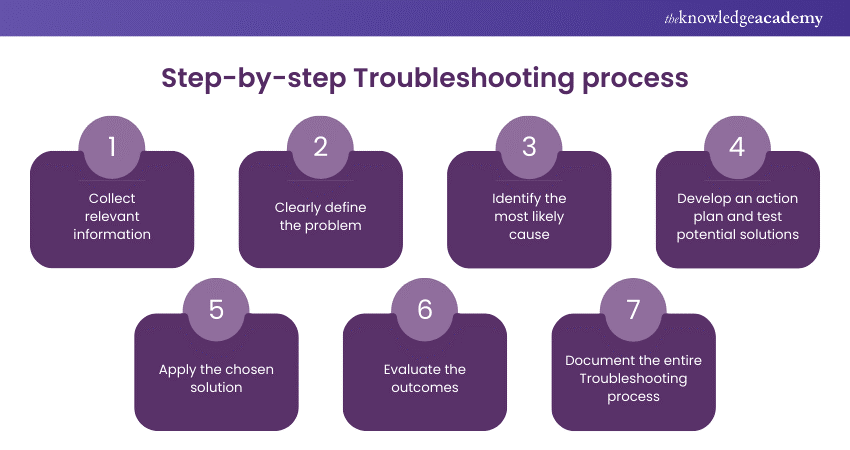
Below is a chart giving the step-by-step process of troubleshooting:
Scenario #2 - User Can't Login To Their Computer
"Noah reports that he can no longer login to his Dell tower pc at home. He calls you up since you know tech stuff pretty well and wants some advice."
ⓘ Solutions for this scenario are suggested from the study group below.
Scenario #3 - No Internet Access
"Gibby reports that he no longer has internet and would like to figure out why his YouTube music videos are no longer loading."
ⓘ Solutions for this scenario are suggested from the study group below.
Scenario #4 - Printer Not Printing
"Brian tells his friend from high school that the printer for home room no longer works. He incites you for some help in fixing it since the school won't do it."
ⓘ Solutions for this scenario are suggested from the study group below.
Scenario #5 - Email Not Sending or Receiving
"Kara reports that her emails are no longer sending or receiving. She says that she was last logged in on Friday. That was a few days ago. It is now Monday."
ⓘ Solutions for this scenario are suggested from the study group below.
Homework
❗ Put a solution as a comment under this page for any of the scenarios. If you can create your own scenario as well, more power to you!